LEXI DOWNLOAD MANAGER

LEXI APPS / DOWNLOAD MANAGER

Downloads, plainly fast.

A free download manager for Windows 10 & 11 (64-bit). Multi-part acceleration, 3-stage floating progress dialog, zero native Save-As popups, multiple queues, 25+ built-in file hosts across 200+ official mirrors, smart Debrid routing, 1,000+ video sites with clip trimming, live HLS stream capture, torrents, optional Click'n'Load 2, and official Chrome Web Store & Firefox extensions. No ads, no account.

No ads — no account — local only

Windows 10 & 11 (64-bit)

Desktop app & extensions.

01Windows Setup

Desktop Installer

Standard Windows installation with automatic background updates, magnet and .torrent association, and optional startup in the system tray.

Package
Lexi Download Manager Setup (.exe)
System
Windows 10 / 11 (64-bit)
Price
Free. No ads, no account.
Updates
Automatic in the background.
Interface
English and Turkish.
02Official Stores & Bundled

Browser Extensions

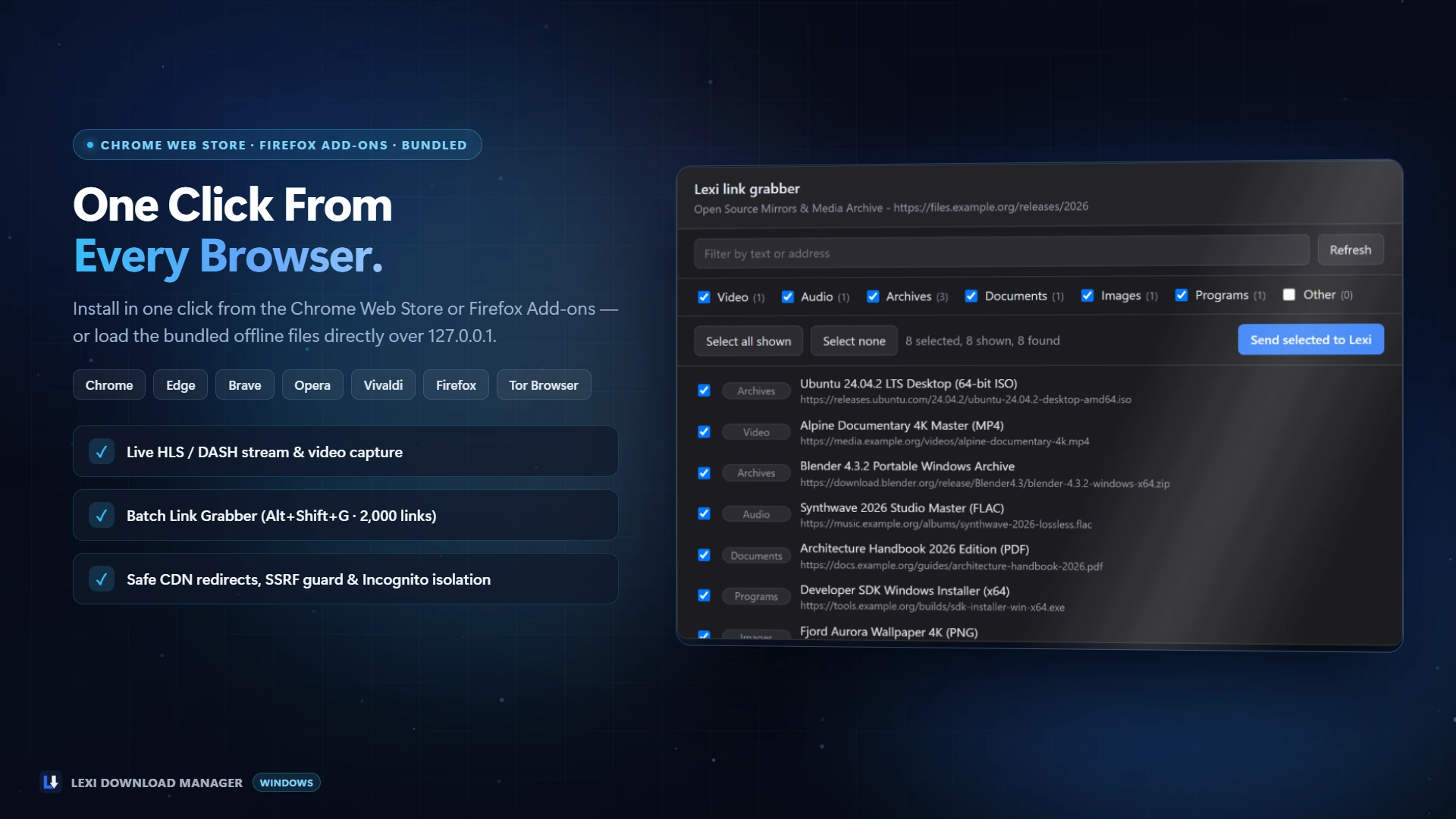
Install in one click from the Chrome Web Store or Firefox Add-ons — bundled local extension files also ship inside the installer for offline setups.

Browsers
Chrome, Edge, Brave, Opera, Vivaldi, Firefox
Channel
127.0.0.1:19847 (local loopback only)
Security
Encrypted cookies, proxy & pairing token.
Telemetry
None. Zero external servers.

01 / LEXI DOWNLOAD MANAGER / WINDOWS

Capture. Route. Finish.

From a single file in your browser to a 2,000-link batch, a 1080p video stream, or a multi-file torrent — handled locally in three steps.

How it works

  1. Intercept or grab

    Browser downloads, page link batches (Alt+Shift+G), playing HLS streams, magnet links, and clipboard URLs pass straight to Lexi with session cookies intact.

  2. Route or pick format

    Let automatic category rules sort the file, open the optional “Save as” dialog with live free disk space, or choose video resolution, audio track, and subtitles.

  3. Accelerate & verify

    Files split into parallel parts with a live speed chart and piece bars. Pause, resume, refresh expired links, verify checksums, and scan with Windows Defender.

See it in action

Product showcase — Zero Save-As 3-stage floating dialog, official store & bundled extensions, 4K clip trimming, Debrid, and end-to-end SOCKS5 & Tor.

Feature showcase — click any card to enlarge

Lexi Download Manager — free multi-part download manager for Windows Zero browser Save-As popups and 3-stage IDM-style floating download dialog with live SVG speed graph and 16 parallel segments Bundled Chrome, Edge, Brave, Opera, Vivaldi, Firefox and Tor extensions with Batch Link Grabber 1,000+ video sites, 4K quality picker, MP3 audio extraction, clip trimming and SponsorBlock Debrid services (Real-Debrid, AllDebrid, TorBox), Mega, Gofile, Pixeldrain, Buzzheavier, Krakenfiles, 1Fichier and BitTorrent queues New: End-to-end SOCKS5/SOCKS5h and Tor proxy, DPAPI encrypted vault, SHA-256 checksum, Windows Defender and Zip-Slip shield

The app, screen by screen — click image to zoom

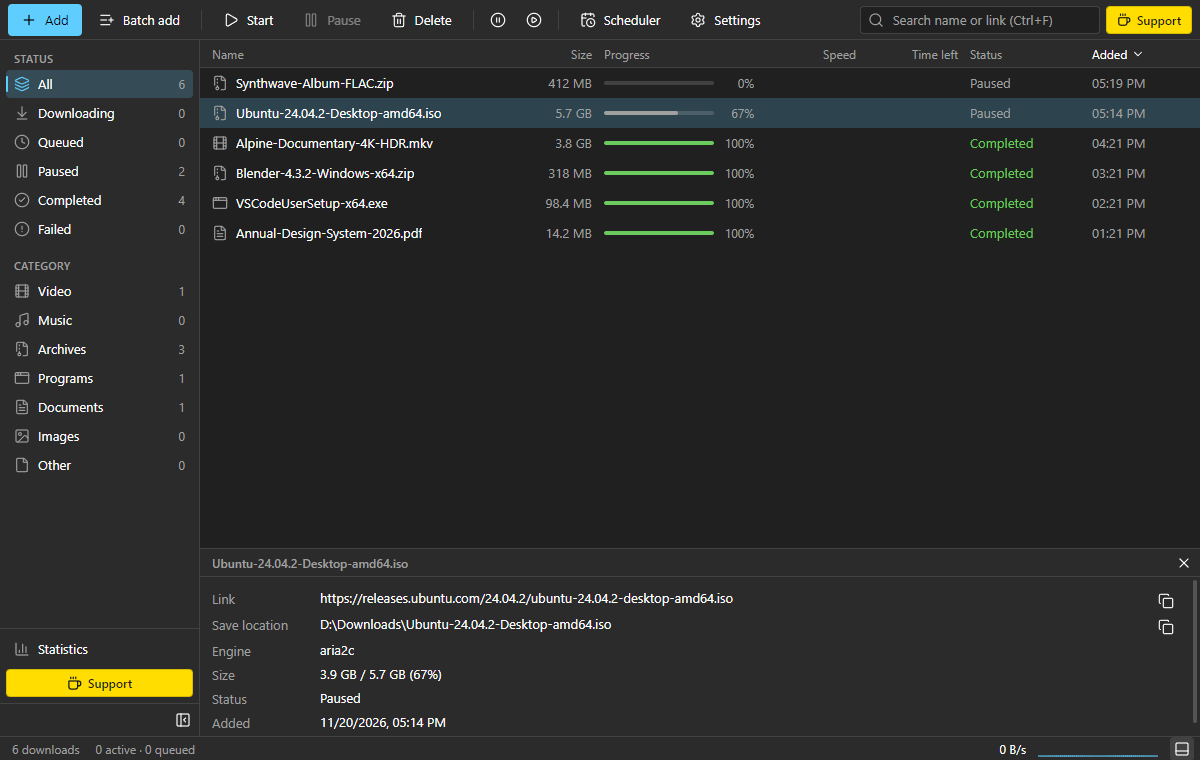
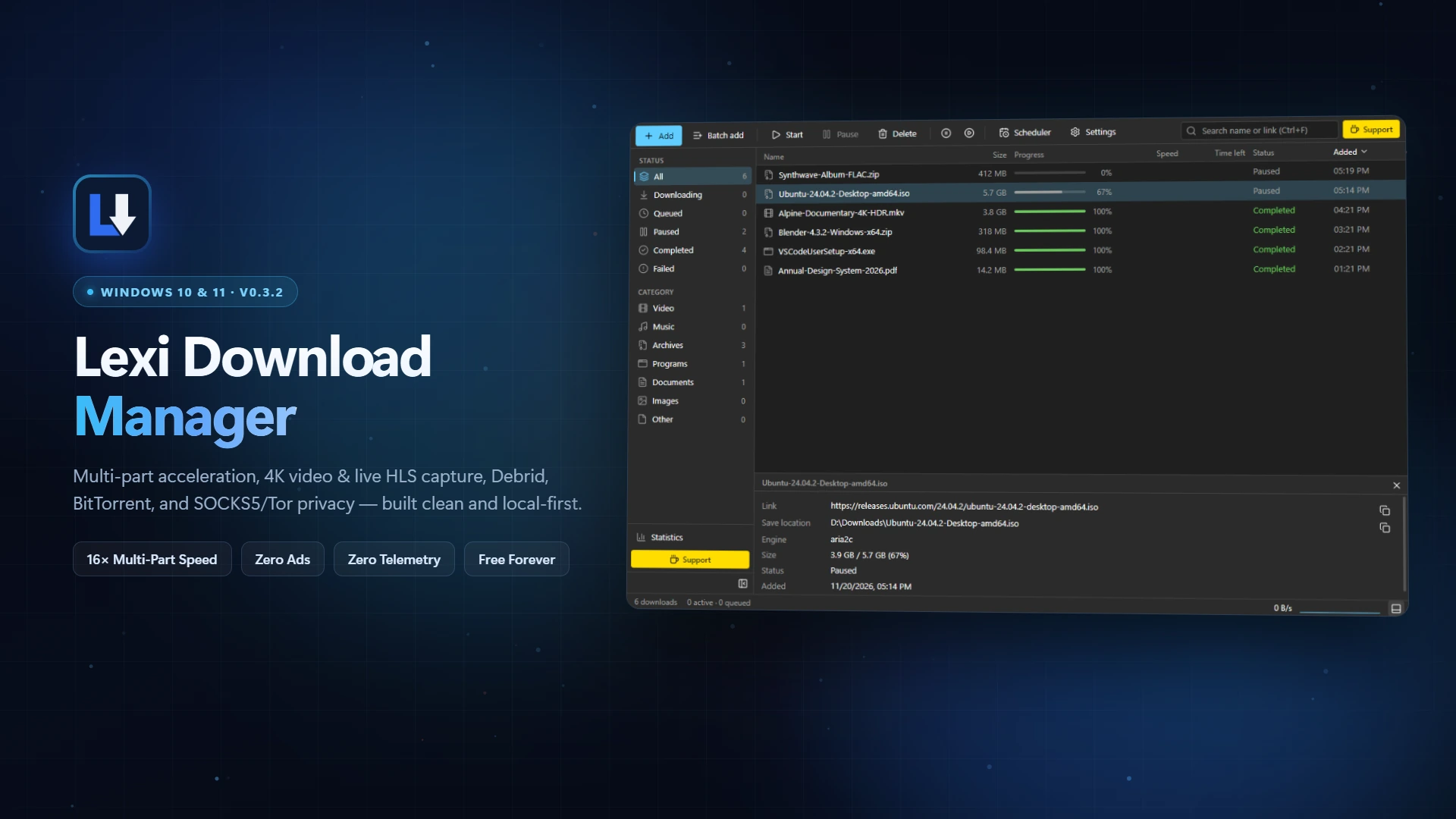
Lexi Download Manager main window with download queue, category sidebar, live speed graph, and piece bars.
Fig. 01 / 08 Main window — download queues, status & category sidebar, live speed chart, and piece progress bars.
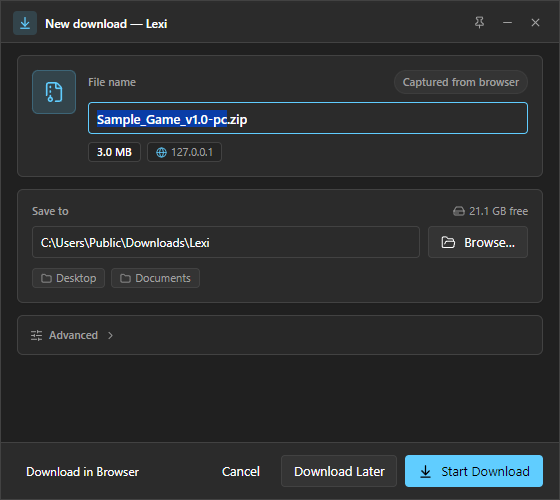
Lexi Download Manager 3-stage floating download dialog — Stage 1 Save confirmation with live free disk space and recent folder chips.
Fig. 02 / 08 Floating dialog (Stage 1) — zero browser Save-As popups; live free disk space, recent folders, queue picker, and Browser Handback.
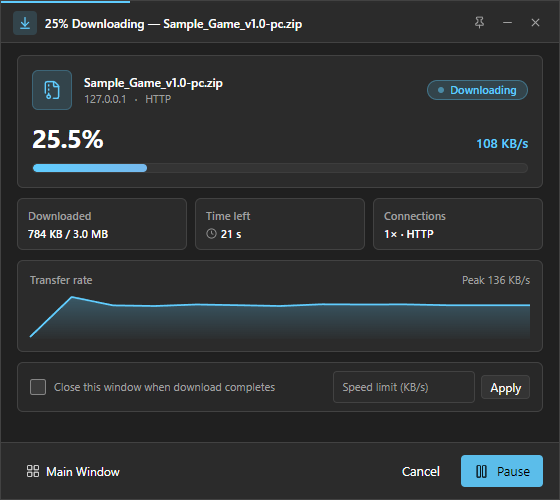
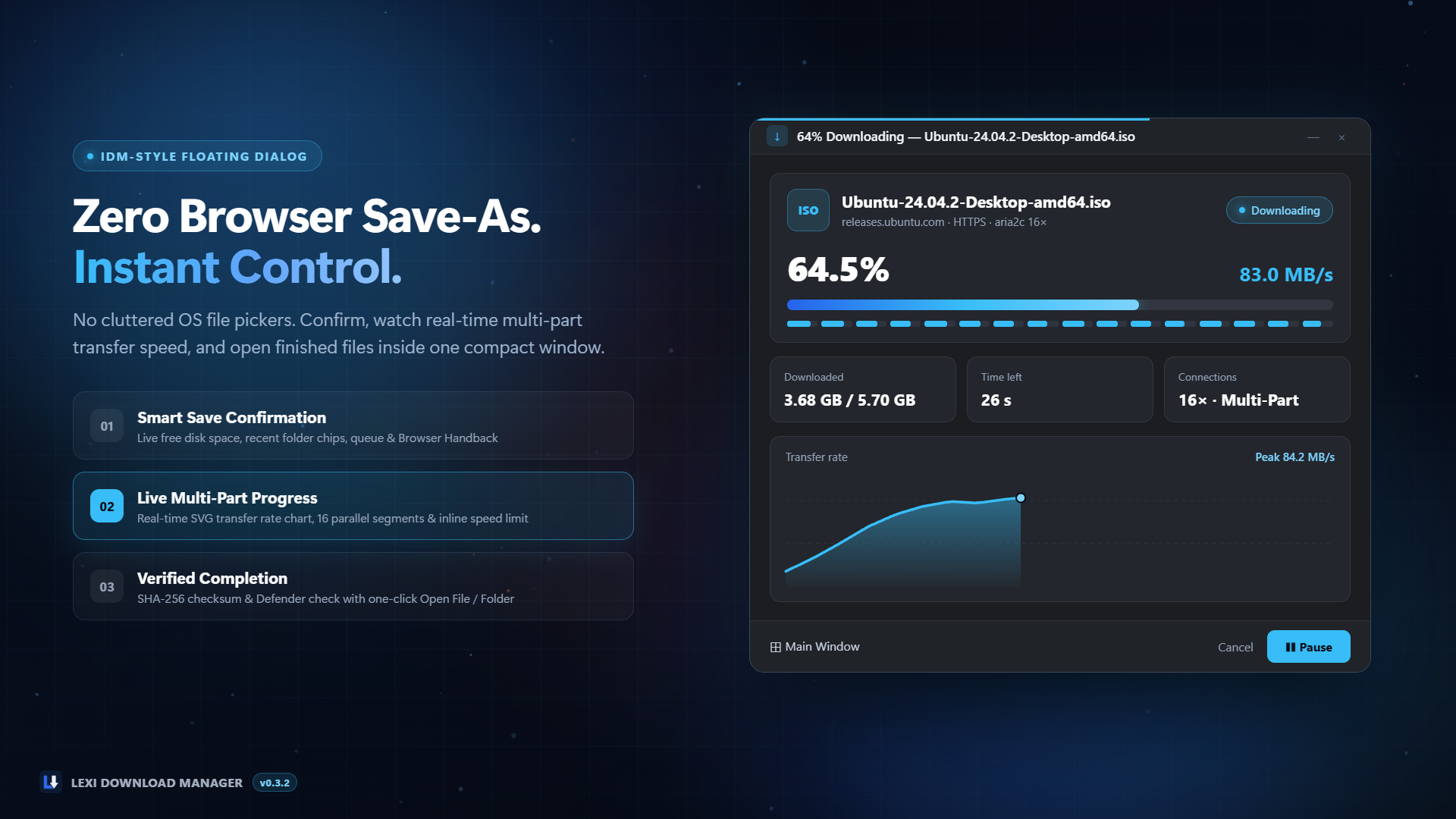
Lexi Download Manager 3-stage floating download dialog — Stage 2 Live multi-part progress with SVG transfer speed graph and segment bars.
Fig. 03 / 08 Floating dialog (Stage 2) — real-time multi-part transfer rate chart, parallel segment bars, and inline speed limit.
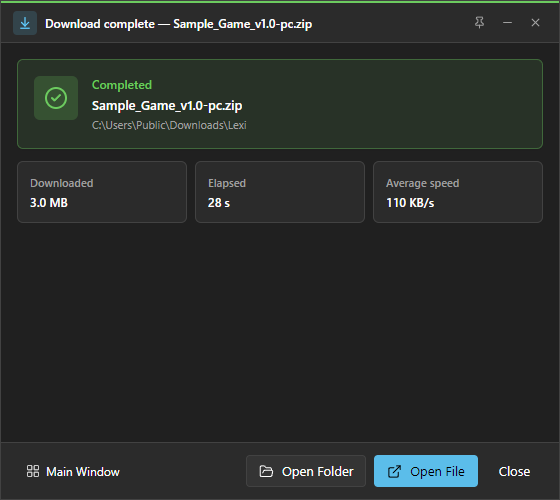
Lexi Download Manager 3-stage floating download dialog — Stage 3 Completed summary with one-click Open File and Open Folder.
Fig. 04 / 08 Floating dialog (Stage 3) — clean completion summary with SHA-256 & Defender check plus one-click Open File / Folder.
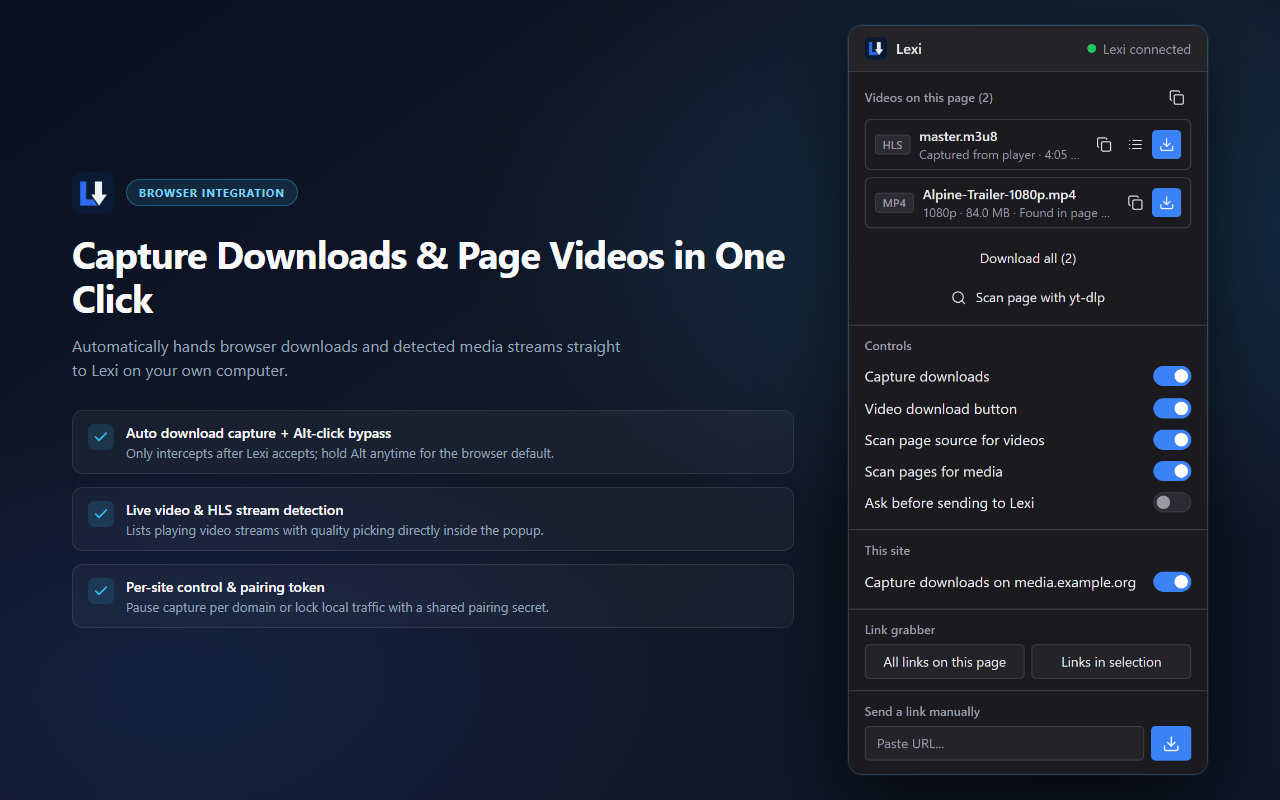
Lexi Download Manager bundled browser extension popup with HLS stream detection and per-site toggle.
Fig. 05 / 08 Bundled browser extension — live connection indicator, playing HLS stream capture, and per-site interception toggle.
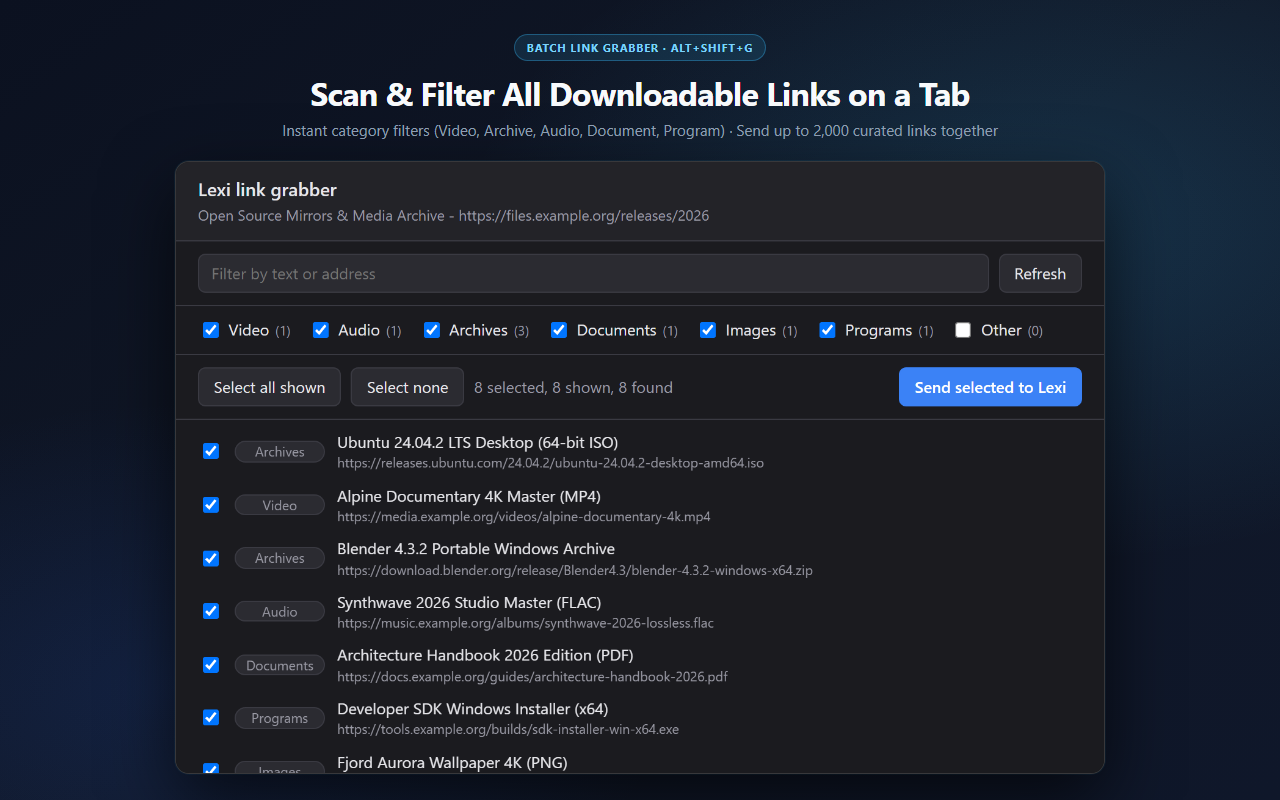
Lexi Download Manager Batch Link Grabber capturing and filtering page links.
Fig. 06 / 08 Batch Link Grabber (Alt+Shift+G) — filter and queue up to 2,000 page links by extension or pattern in one click.
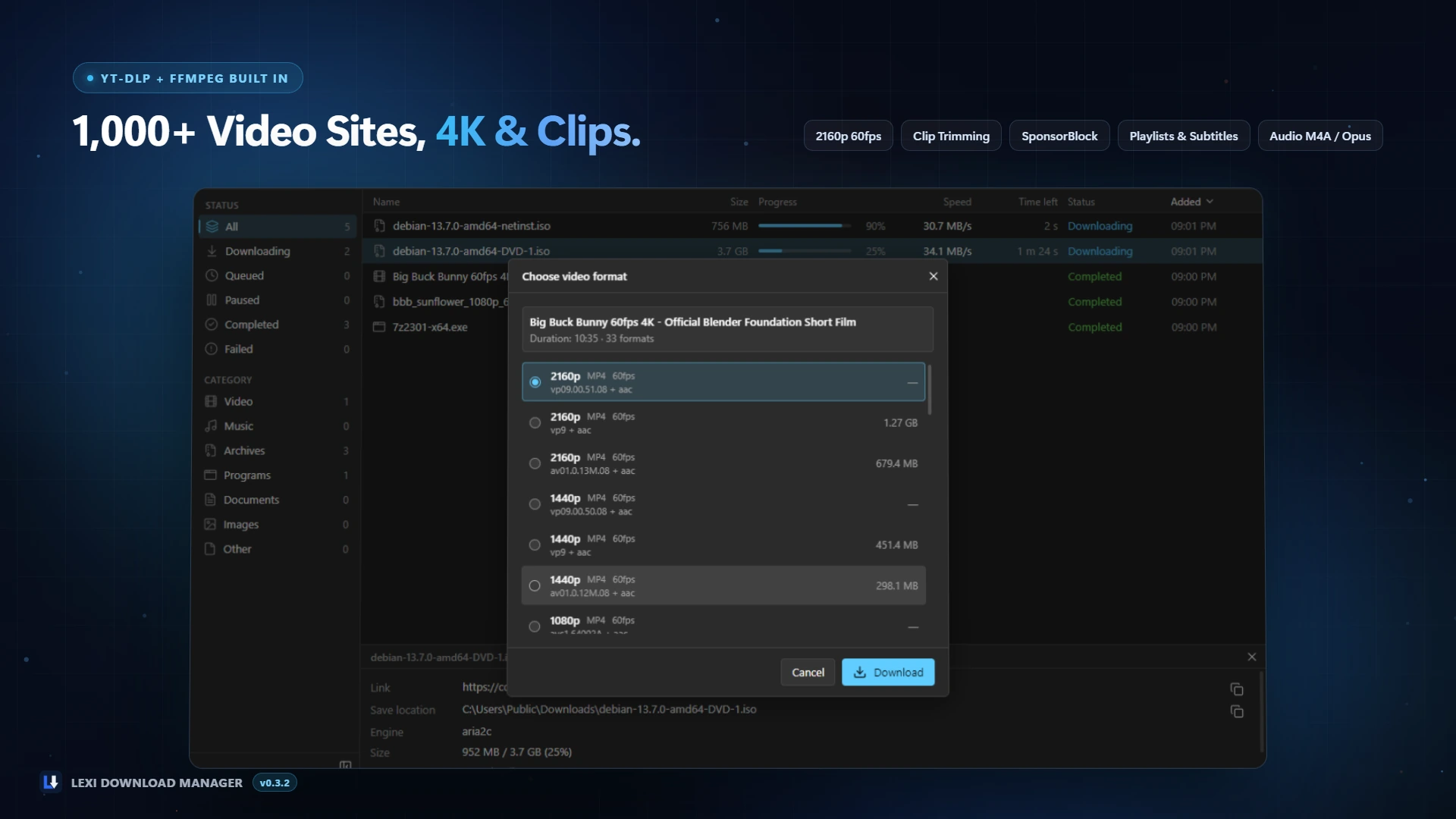
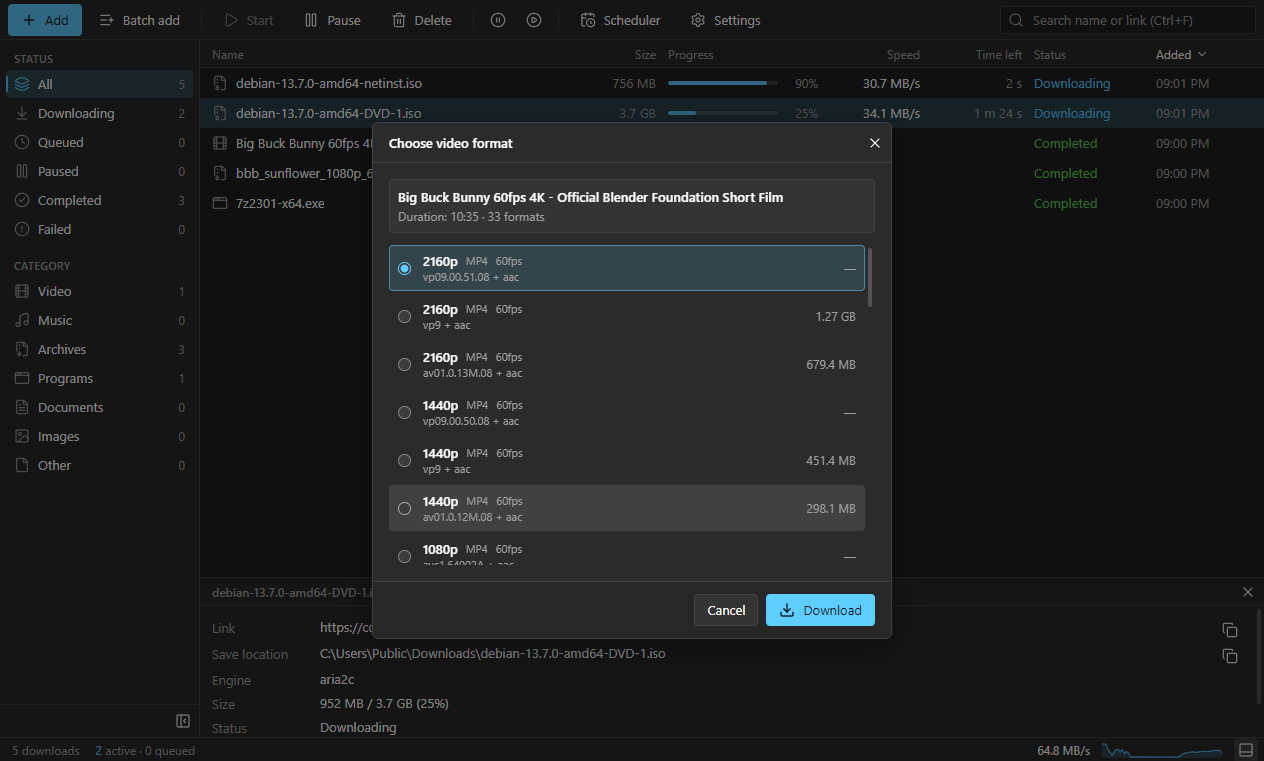
Lexi Download Manager video format selection dialog with clip trimming and subtitles.
Fig. 07 / 08 Video quality & clip trimmer — pick 4K/1080p/MP3, set start–end clip timestamps, subtitles, and SponsorBlock.
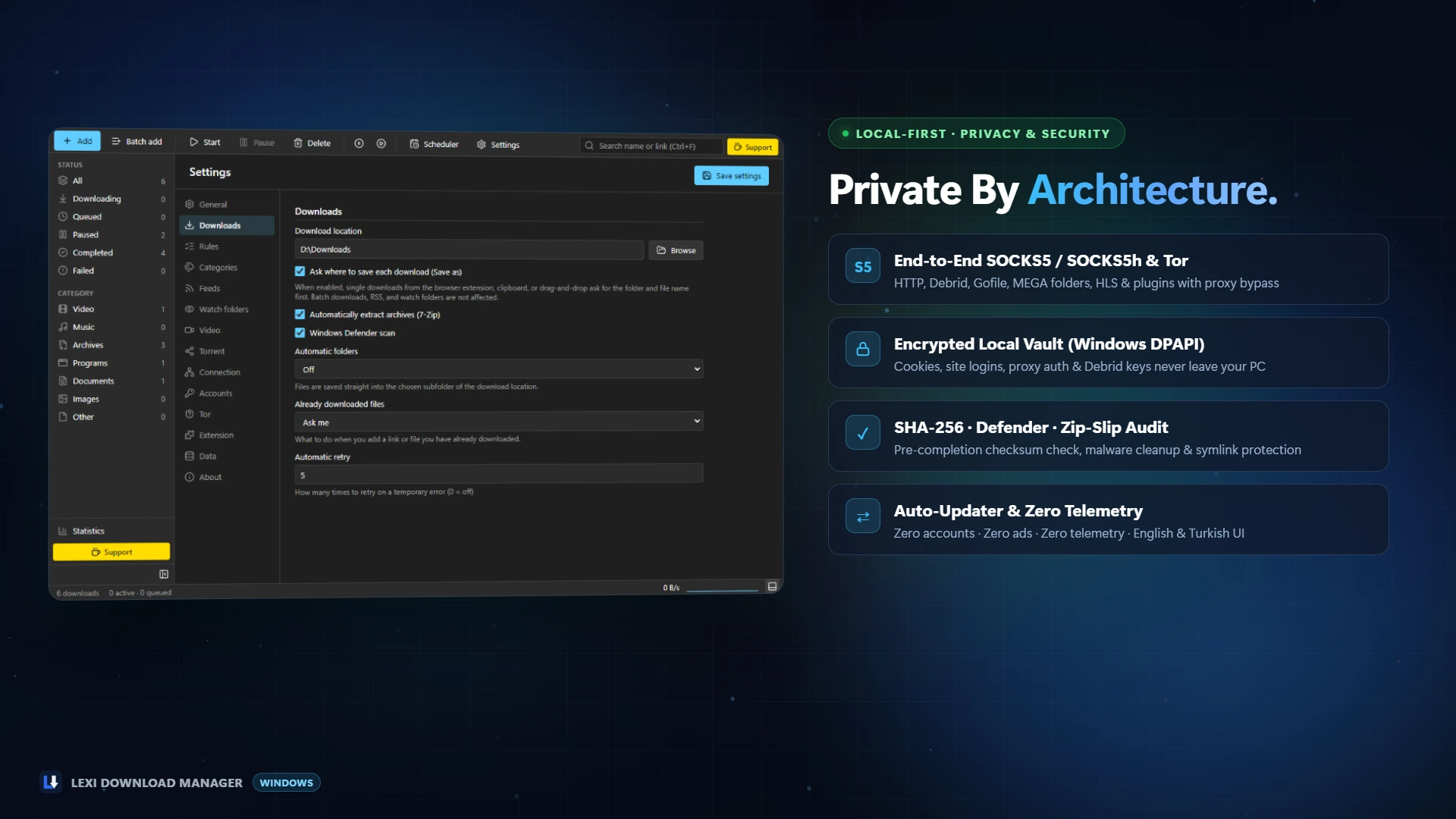
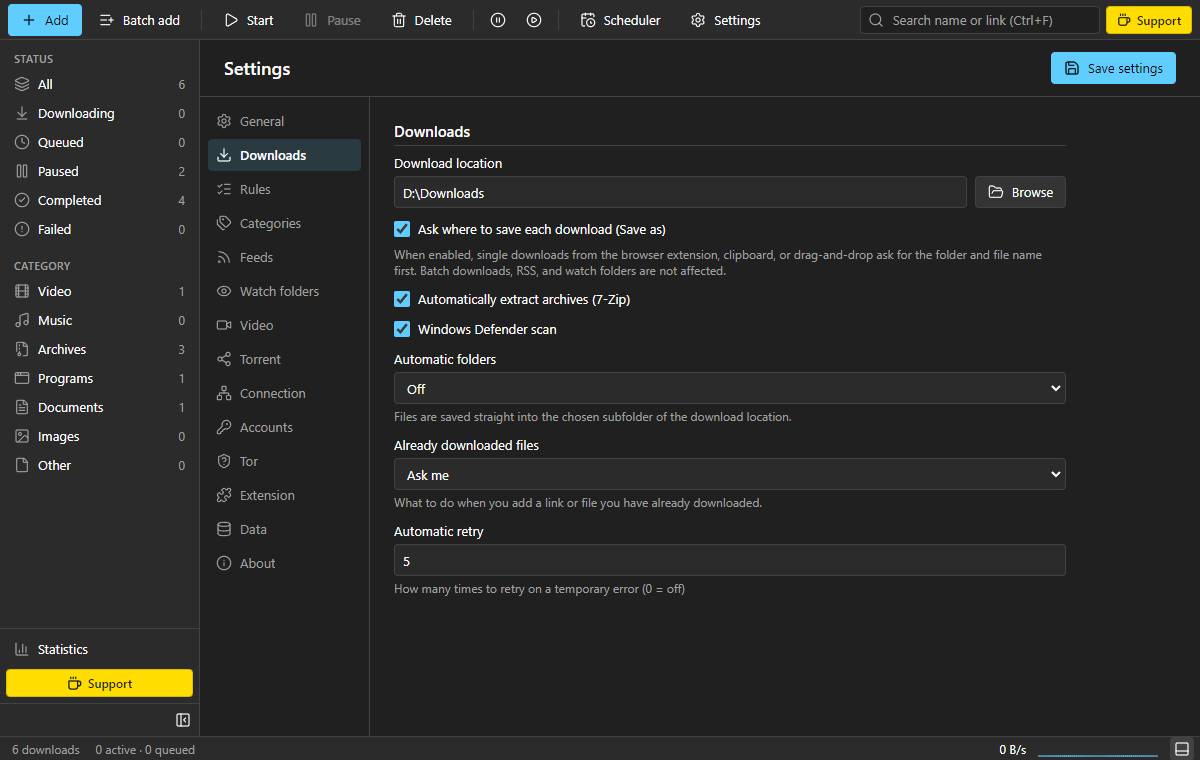
Lexi Download Manager tabbed settings window with bilingual live search.
Fig. 08 / 08 Tabbed settings — live EN/TR search, download rules, Debrid keys, torrent seeding, end-to-end SOCKS5/Tor, and extension pairing.

What is inside

Multi-part & queues
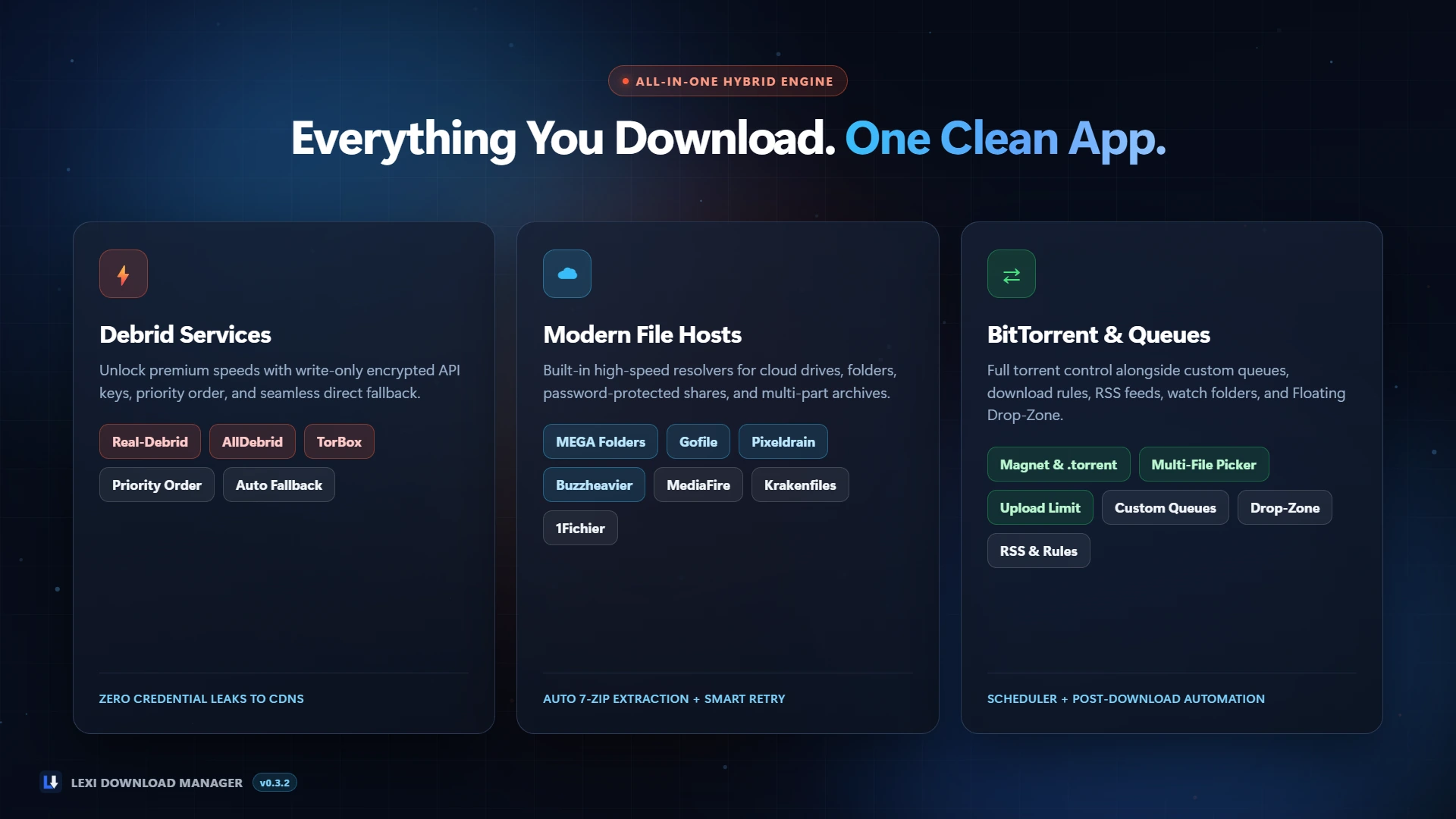
Splits each file into parallel segments via aria2c. Multiple independent download queues, combined status/category/queue filters with chips, drag-and-drop priority, live speed SVG chart, piece bitfield bars, resizable details panel with multi-select summary, bulk speed limits, and .txt link export.
Video sites
Downloads from YouTube and hundreds of sites with quality profiles, video clip trimming (start–end timestamps), safe thumbnail previews, SponsorBlock chapter skipping, metadata embedding, playlist selection, audio-only (m4a / opus), and subtitles.
HLS streams
The browser extension detects live HLS and media streams playing on a page, lists available resolutions in the popup, and merges segments into a single file.
Torrents
Magnet links and local .torrent files with selective multi-file picker, live global upload speed limit (KB/s), and configurable post-download seed limits. Unused .torrent copies are cleaned up automatically.
Hosts & Debrid
Smart 3-mode routing for Real-Debrid, AllDebrid, and TorBox (write-only encrypted API keys), per-host connection & concurrency limits, and automatic short-lived token refresh. Native resolvers for 25+ file hosts across 200+ official mirrors — including Pixeldrain (7 mirrors, lists & folders), Buzzheavier/Bzzhr, 1Fichier (13 mirrors & passwords), MediaFire (folders), Krakenfiles, Mega (files & folders), Gofile (passwords & folders), Google Drive (files & folders), Yandex Disk, Dropbox, Koofr, SwissTransfer, Workupload, Mail.ru Cloud, Cyberfile, Bunkr, Ranoz.gg, Rootz.so, Mixdrop, Catbox, FileDitch, Upload.ee, GameBanana, ShareMods, ModsFire, UploadHaven, and OneDrive — plus 32 CAPTCHA-gated Debrid/extension hosts with 1-click “Open in browser” handoff and opt-in Click'n'Load 2 (Filecrypt) support.
Extension
Official 1-click extensions on Chrome Web Store (Chrome, Edge, Brave, Opera, Vivaldi) and Firefox Add-ons — plus bundled local files inside the installer for offline setup. Synced with all 200+ supported host domains, eliminates native browser Save-As popups when Lexi is active, and includes a 15-minute browser handback bridge, 1-click “Open in browser” CAPTCHA capture, optional Click'n'Load 2 (127.0.0.1:9666, off by default with confirmation prompt), Batch Link Grabber (Alt+Shift+G, up to 2,000 links), per-site toggle, Alt-click bypass, and expired link refresh.
Dialog & Drop-Zone
Sleek 3-stage floating download dialog (Prompt with live free disk space & recent folder chips → Live Progress with SVG speed chart, segment bars & inline speed limit → Completion summary), paired with an always-on-top Floating Drop-Zone widget for drag-and-drop URLs and .torrent files and a bilingual Settings search bar.
Automation
Custom download rules (by extension, domain, or URL pattern → target folder, speed limit, naming template, post-action), custom categories, RSS/Atom feeds, and watched folders.
Privacy
No account, no ads, no tracking. Saved cookies, HTTP authentication, proxy credentials, site accounts, and extension pairing token (X-Lexi-Token) are encrypted on your PC.
Tor & proxy
End-to-end global or per-download HTTP, HTTPS, and SOCKS5/SOCKS5h proxy support (direct, Debrid, file hosts, MEGA, HLS, and yt-dlp), plus built-in Tor routing.
Backups
Automatic daily database backups (7 automatic, 20 manual) and safe settings export/import.
Integrity
Expected checksum verification (SHA-256 / MD5), mirror URL fallback, duplicate download warnings, and automatic Windows Defender scan.
System requirements

Operating system
Windows 10 or 11, 64-bit.
Browser extension
Optional. Chrome and other Chromium browsers 112 or newer; Firefox 140 or newer.
Helper tools
Download engines such as aria2c and yt-dlp ship inside the installer; nothing extra to install.

Download on GitHub Chrome Web Store Firefox Add-ons

02 / Support & Contact

Free software, backed by you.

  • Lexi Download Manager is completely free: no ads, no tracking, no account, and no paid features.
  • If Lexi saves you time, you can support ongoing development and Windows code-signing certificate costs via Buy Me a Coffee or Patreon.
  • Bug reports and questions: [email protected] — or use Settings → About → Report a problem inside the app.
  • Each release publishes the full open-source code archives and SHA256SUMS.txt for the bundled tools (aria2, GMP, FFmpeg, 7-Zip).

FAQ / LEXI DOWNLOAD MANAGER

Short answers.

Is it really free?

Yes. Every feature in Lexi Download Manager is free, with no ads, no account, and no paid version.

Windows says “Windows protected your PC”. What do I do?

Windows SmartScreen may show this prompt the first time you run the installer because Lexi is not code-signed yet. Click More info, then Run anyway. Always download Lexi from the official GitHub releases page. Step-by-step guide.

How do I add the browser extension?

Install in one click from the Chrome Web Store (Chrome, Edge, Brave, Opera, Vivaldi) or Firefox Add-ons — or open Settings → Browser extension inside Lexi for both direct store buttons and the bundled local files.

How does the browser extension handle my privacy?

All captured URLs, cookies, and page media links are sent exclusively to the Lexi app on your own computer at 127.0.0.1:19847. Nothing is ever sent to external servers. See our Privacy Policy.

Clicking a magnet link opens another program.

Lexi never replaces your existing torrent client on its own. Go to Settings → Torrent → Make default torrent app and choose Lexi for magnet and .torrent in Windows Default apps.

What are the other files in each release?

latest.yml and .blockmap are used by the automatic updater. *.tar.xz, *.7z, lexi-ffmpeg-*-build-recipe.zip, and SHA256SUMS.txt are the source code archives of the bundled open-source tools (aria2, GMP, FFmpeg, 7-Zip), published to comply with their licenses.