Guide / Ren'Py & 18 Engines / Step by step
How to translate a Ren'Py game, step by step.
Most indie visual novels are built with Ren'Py. This visual guide walks you through translating a Ren'Py game into your own language for free with Lexi Game Translator — keeping text tags, variables, character names and fonts intact — and shows how the same modern interface handles 17 other popular game engines like RPG Maker, Unity, Unreal Engine and Godot.
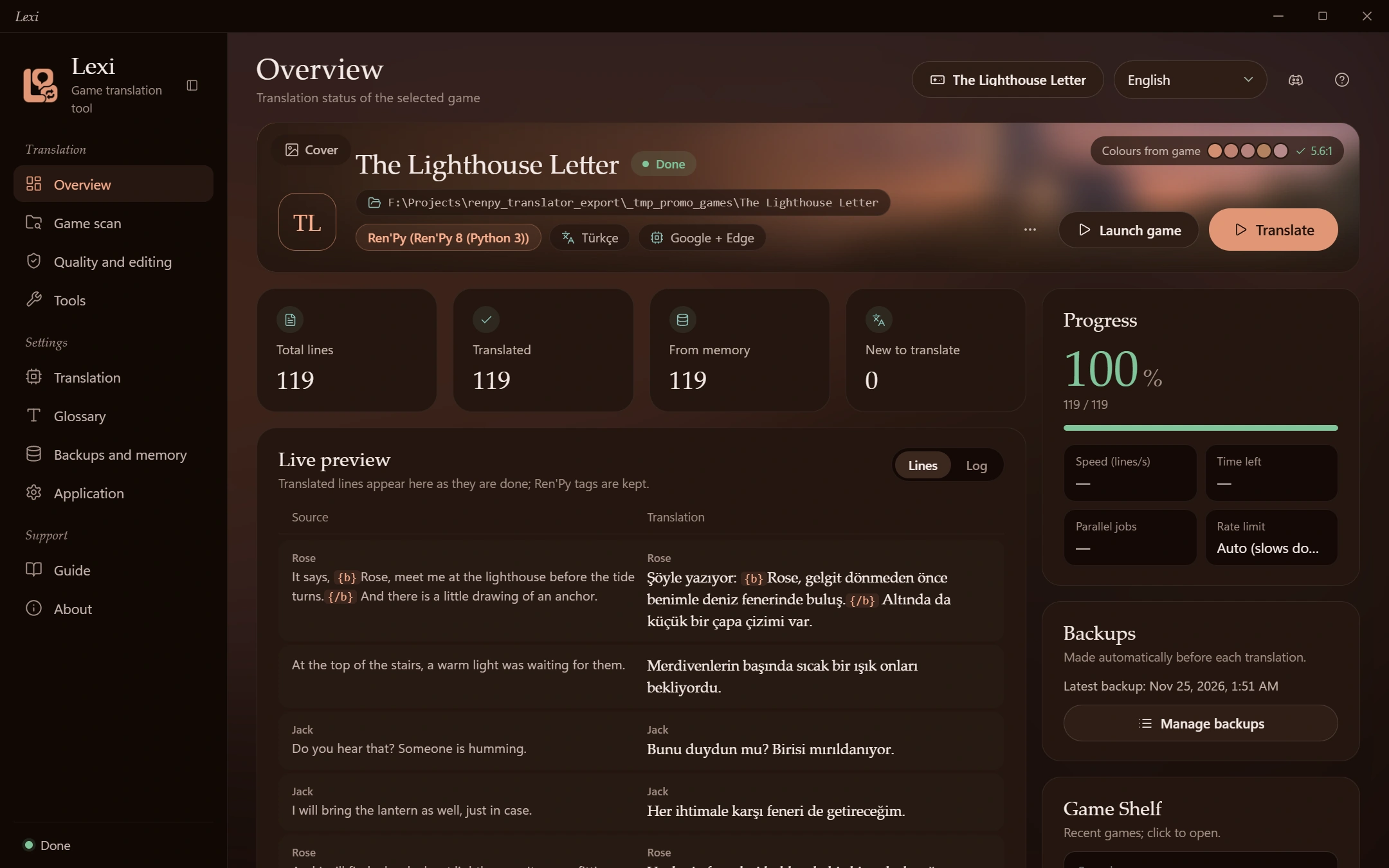
Why translating a Ren'Py game is tricky
A Ren'Py game keeps its story in script files (.rpy). Released games usually ship them only in compiled form (.rpyc), often packed inside .rpa archives. A single line of dialogue can look like this:
e "Welcome back, {b}[player_name]{/b}! You have [gold] coins."Only the spoken words should be translated. {b}…{/b} is a text tag (bold), while [player_name] and [gold] are variables that the game fills in as you play. If a translator changes or drops them (for example, turning [gold] into [oro]), the line shows garbage or Ren'Py stops with an error. Character names and fonts need the same care: a heroine named Rose should not turn into a flower, and a game's English font often lacks accented, Cyrillic, CJK or Arabic letters — showing empty boxes instead of text.
Ren'Py has its own native translation layer inside game/tl/<language>/. Lexi Game Translator writes directly into that system while masking tags, variables and character names automatically and patching missing fonts — so the original story files stay untouched. Drag the handle below to see real in-game differences:
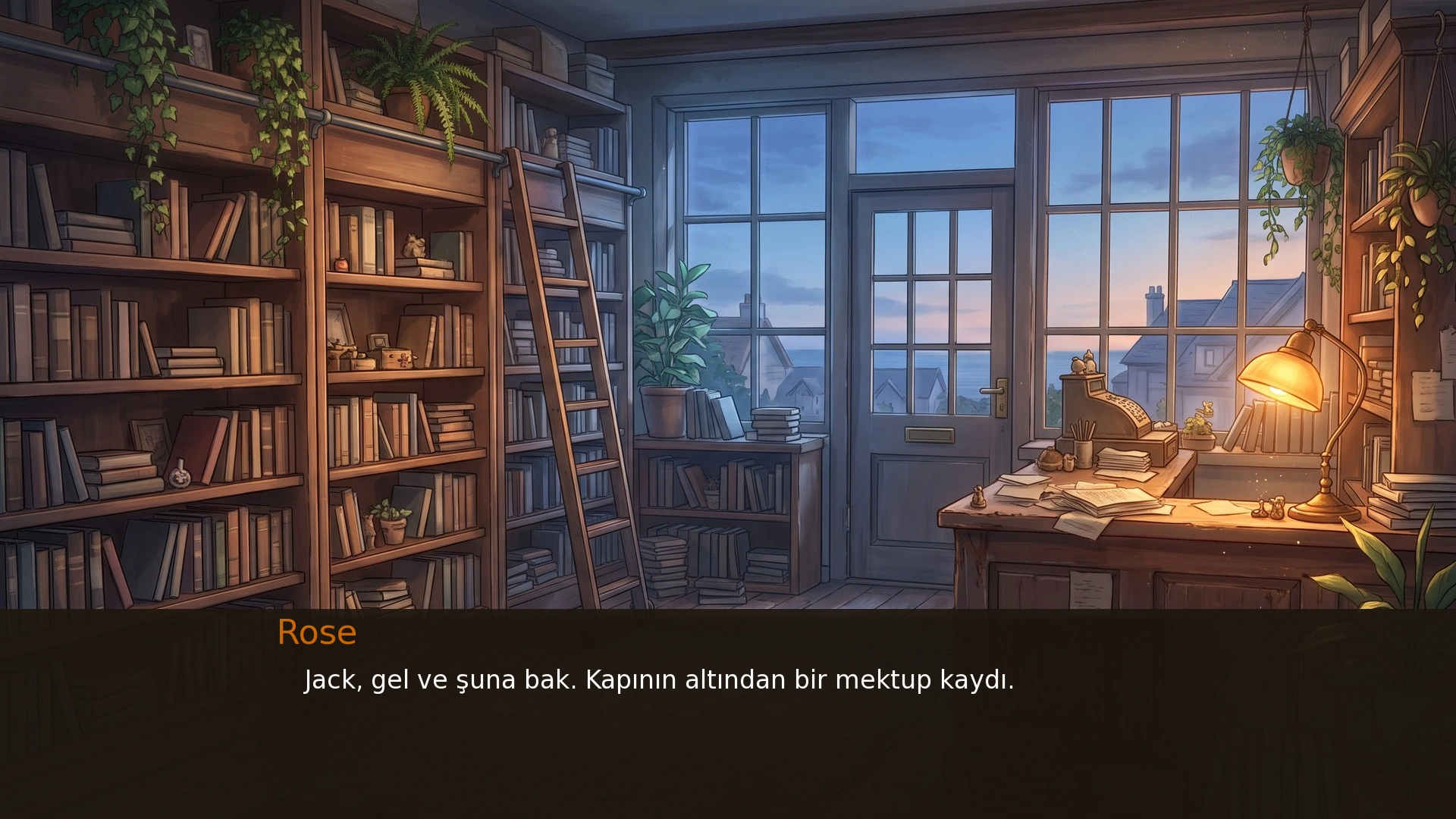
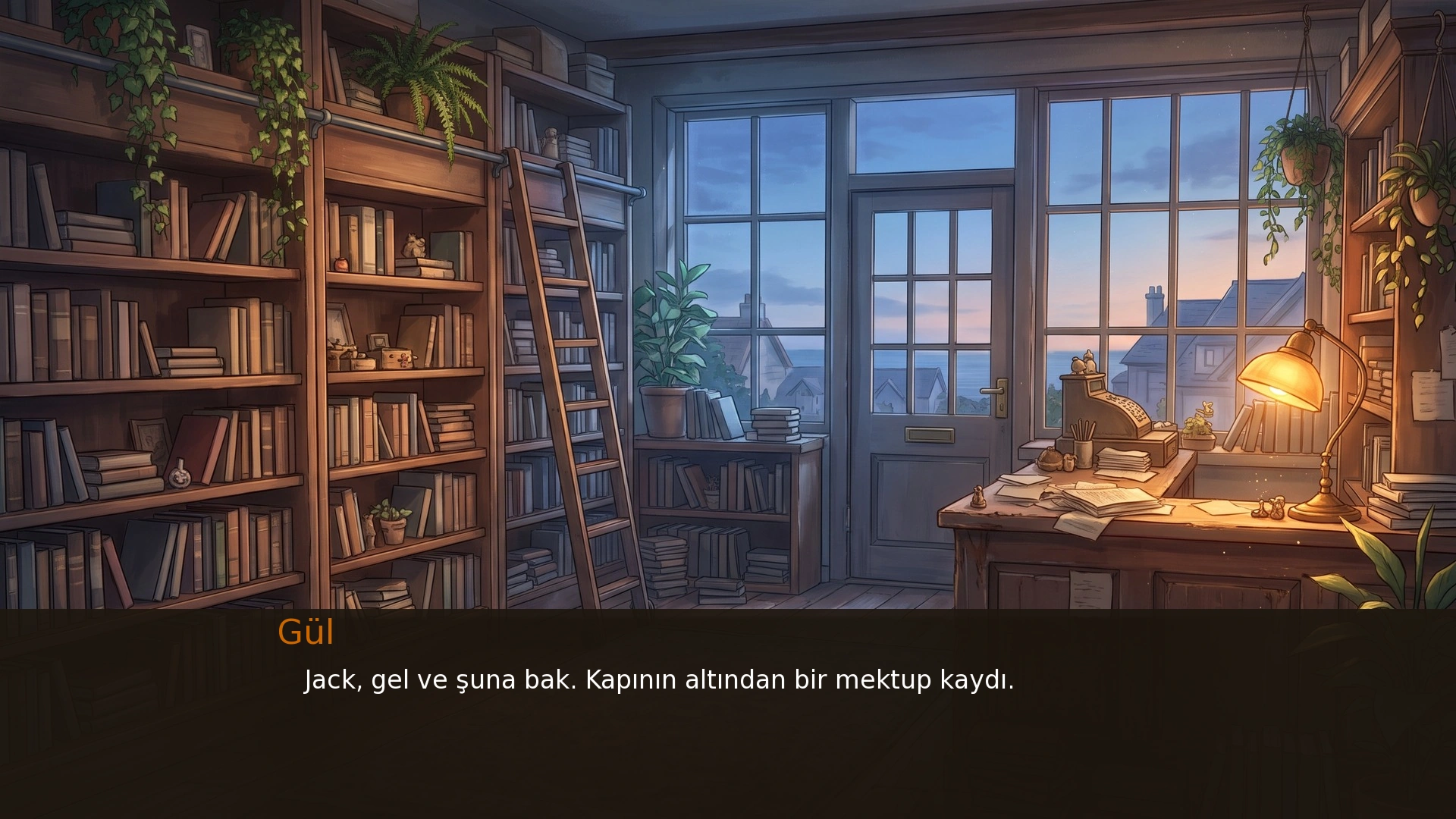
Drag across the image or use left/right arrow keys — real 1920×1080 in-game captures
Before you start
- A PC with Windows 10 or 11 (64-bit). The installer does not need administrator rights.
- The game extracted on your PC: select the folder containing
game, or drag and drop the game folder or its.exefile straight onto the Lexi window. - Some free disk space. Lexi makes a verified copy of the whole
gamefolder before every translation (keeping the last three unlocked backups by default, plus auto-locking your first original backup), so a large game needs roughly the same space again per backup. You can adjust the backup count in Backups and memory. - An internet connection for the online translation engines — or a local AI model with Ollama, LM Studio, or llama.cpp for fully offline translation in Lexi Pro.
Translate a Ren'Py game with Lexi Game Translator
-
Download and install the app
Lexi Game Translator is a free app for Windows 10 and 11 (64-bit) with 12 built-in interface languages (including Turkish and right-to-left Arabic) plus dark and light themes. Download the installer from the official GitHub Releases page and run it.
Because the installer is not code-signed yet, Windows SmartScreen may show a blue warning screen the first time you run it; the install help page shows what to click step by step.
-
Pick or drop the game folder (or .exe)
On first launch the Quick start wizard guides you through the setup; you can also reopen it any time from Guide, or simply drag and drop the game folder or its
.exefile straight onto the Lexi window.Lexi automatically recognizes Ren'Py 7 and Ren'Py 8 (along with 17 other game engines) and runs a read-only scan across
.rpyscripts, compiled.rpycfiles, and packed.rpaarchives — showing total line counts, speakers, and existing memory matches without touching a single file.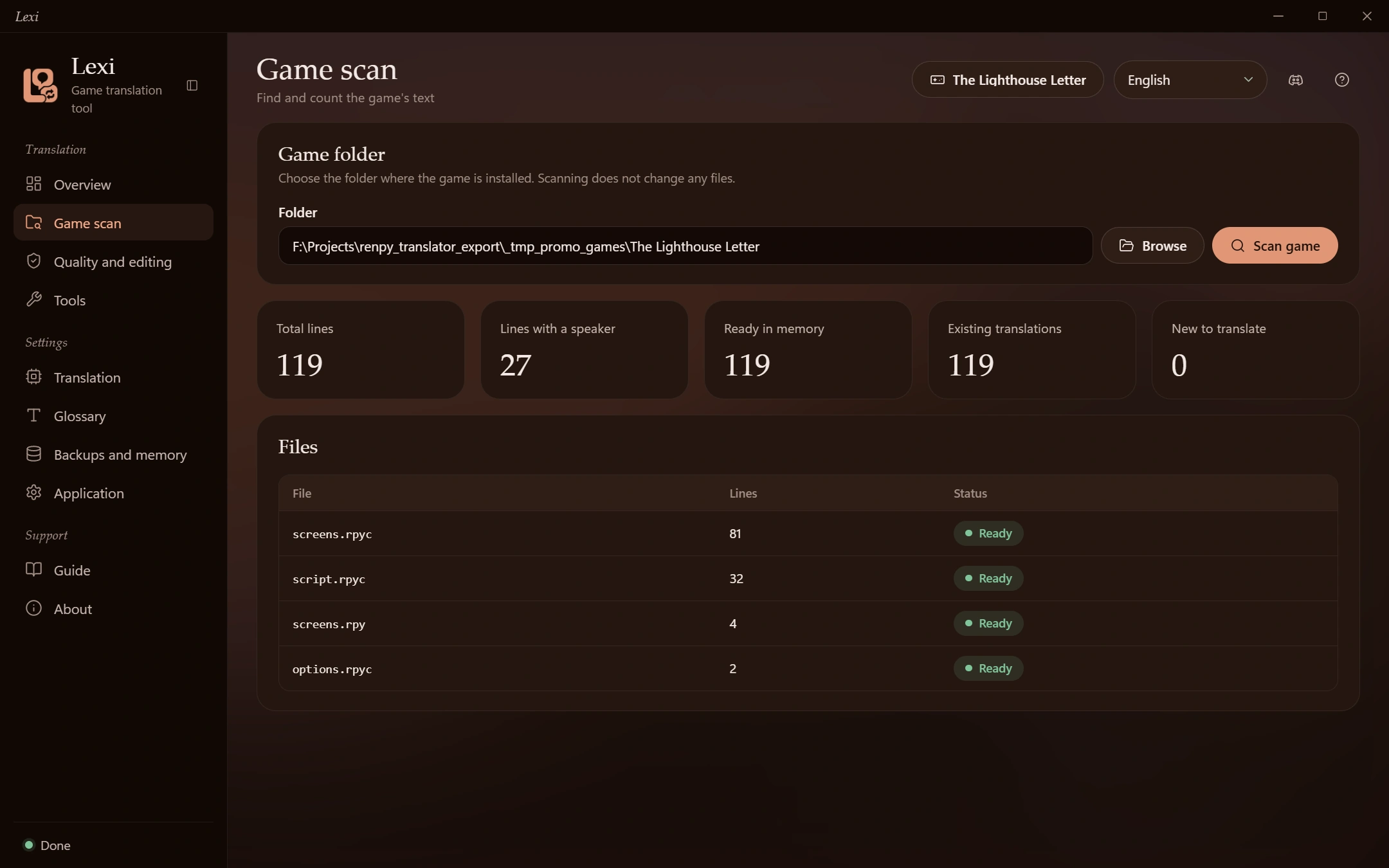
Game scan — inspect files, line counts and memory hits before translating Click to zoom -
Choose your target language and translation engine
Pick your target language from 30+ supported languages. Lexi gives you three clear ways to translate depending on whether you want instant free speed or higher-nuance AI dialogue:
1. Free keyless (Basic)Google + Microsoft Edge run in parallel with automatic fallback. No account, no API key, unlimited lines.
2. Own key machine (Basic)Bing / Microsoft Translator and Yandex Translate are also unlocked in Basic when you enter your own API key.
3. Cloud & local AI (Lexi Pro)1-click presets for Gemini, Groq, Mistral, OpenRouter, DeepSeek, Claude, Cerebras, OpenAI (own key) or offline Ollama / LM Studio / llama.cpp. Patreon $6/mo + 3-day free AI trial.
Whenever a cloud AI job could incur API costs, Lexi calculates the estimated amount up front, waits for your explicit approval, and enforces any spending cap you set.
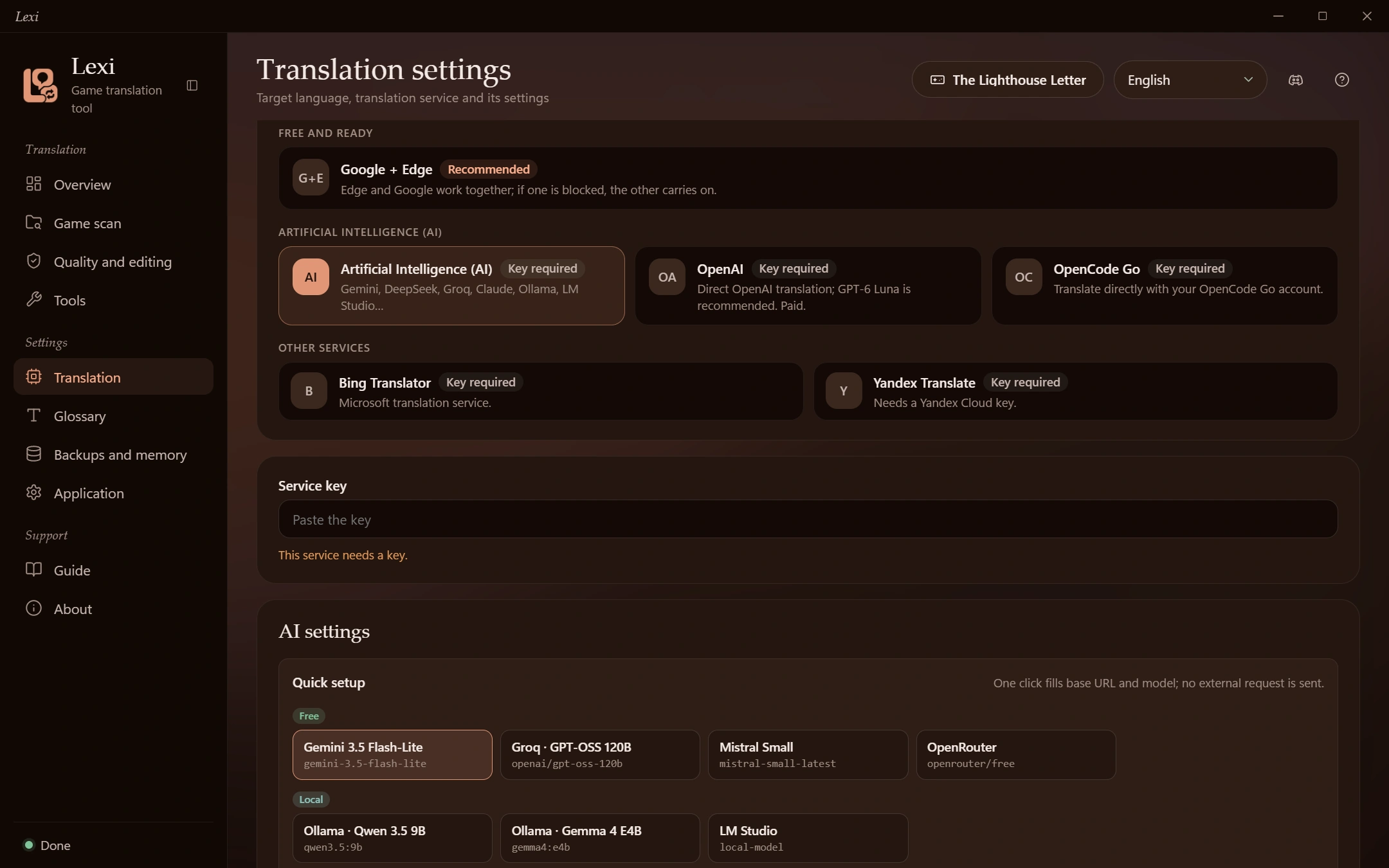
Translation settings — keyless free chain first, 1-click cloud & local AI presets optional Click to zoom -
Start translating and watch live progress
Press Translate. Before writing anything, Lexi creates a verified full copy of the game's
gamefolder as a backup and automatically locks your first original backup. While translating, you can watch lines appear live side by side, see exact speed and time left, and click Pause or Stop at any time — finished lines are saved continuously so the next run picks up from the exact line.Output goes cleanly into
game/tl/<language>/along with a lightweight language-switcher script; the game's own script files are never modified. Lexi also checks fonts both on disk and inside.rpaarchives, automatically installing a bundled fallback font whenever your language's characters are missing (plus RTL support for right-to-left scripts). Games with.srtor.vttvideo subtitles can translate them in the same pass without altering timestamps.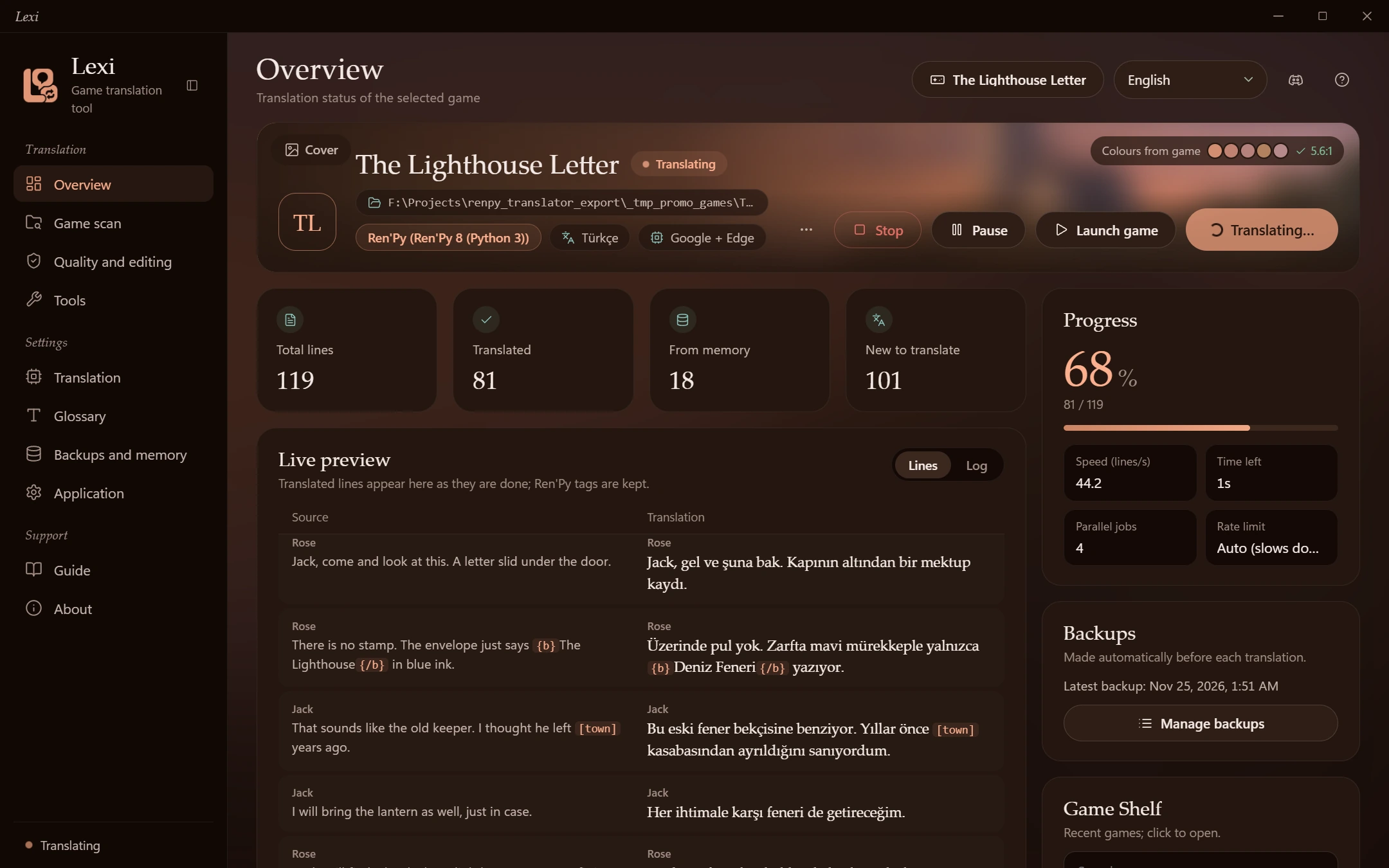
Live progress — real-time speed, Pause/Stop with resume, {b} tags & [variables] preserved Click to zoom -
Launch the game and switch languages
When the run finishes, press Launch game (or reopen any translated title later with one click from the Game Shelf). In the game's main menu, click the globe Language button to pick your language. While playing, press Shift+L any time to toggle instantly between your translation and the original text without restarting.
Inside the new interface: themes, 12 languages & quality editor
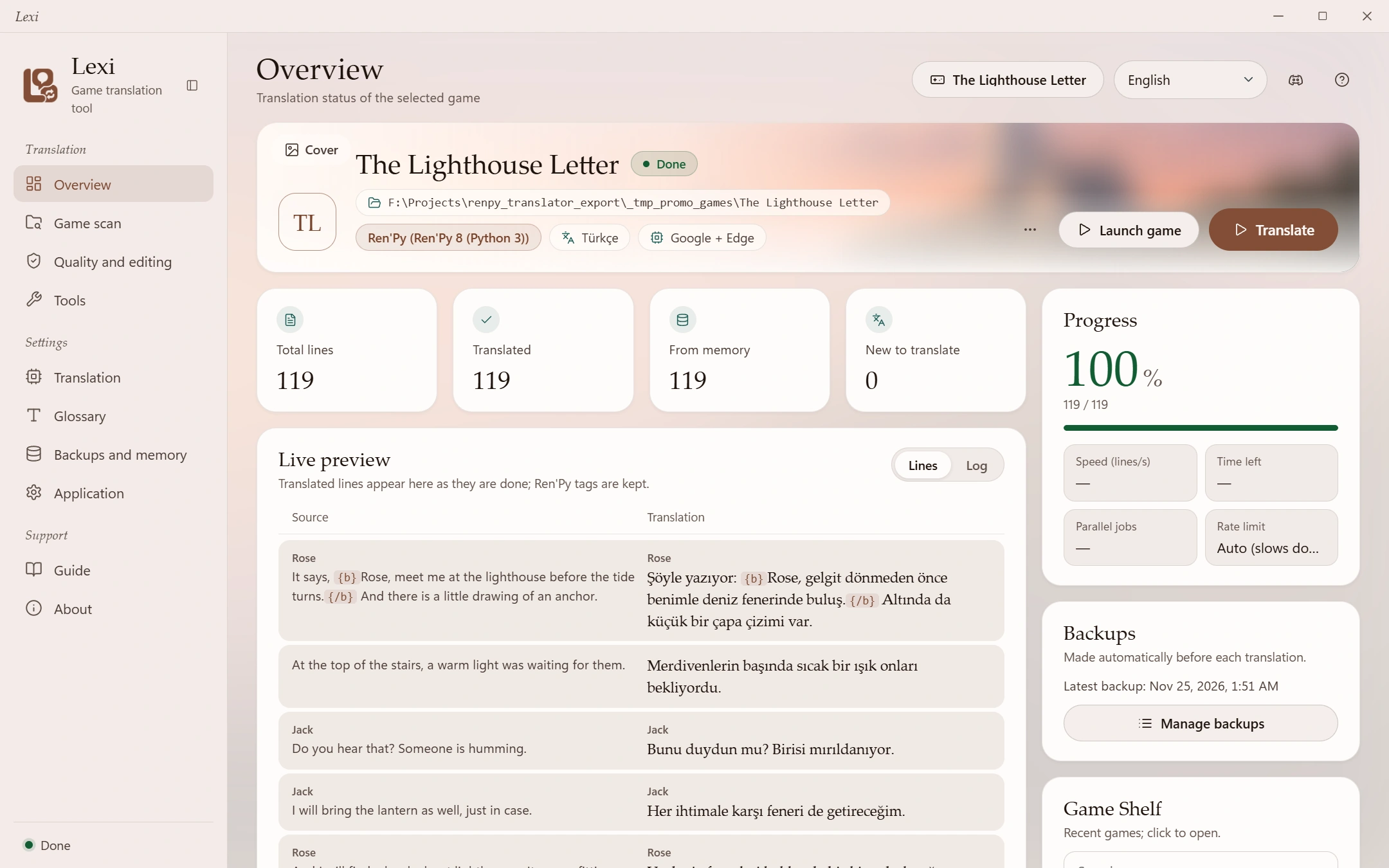
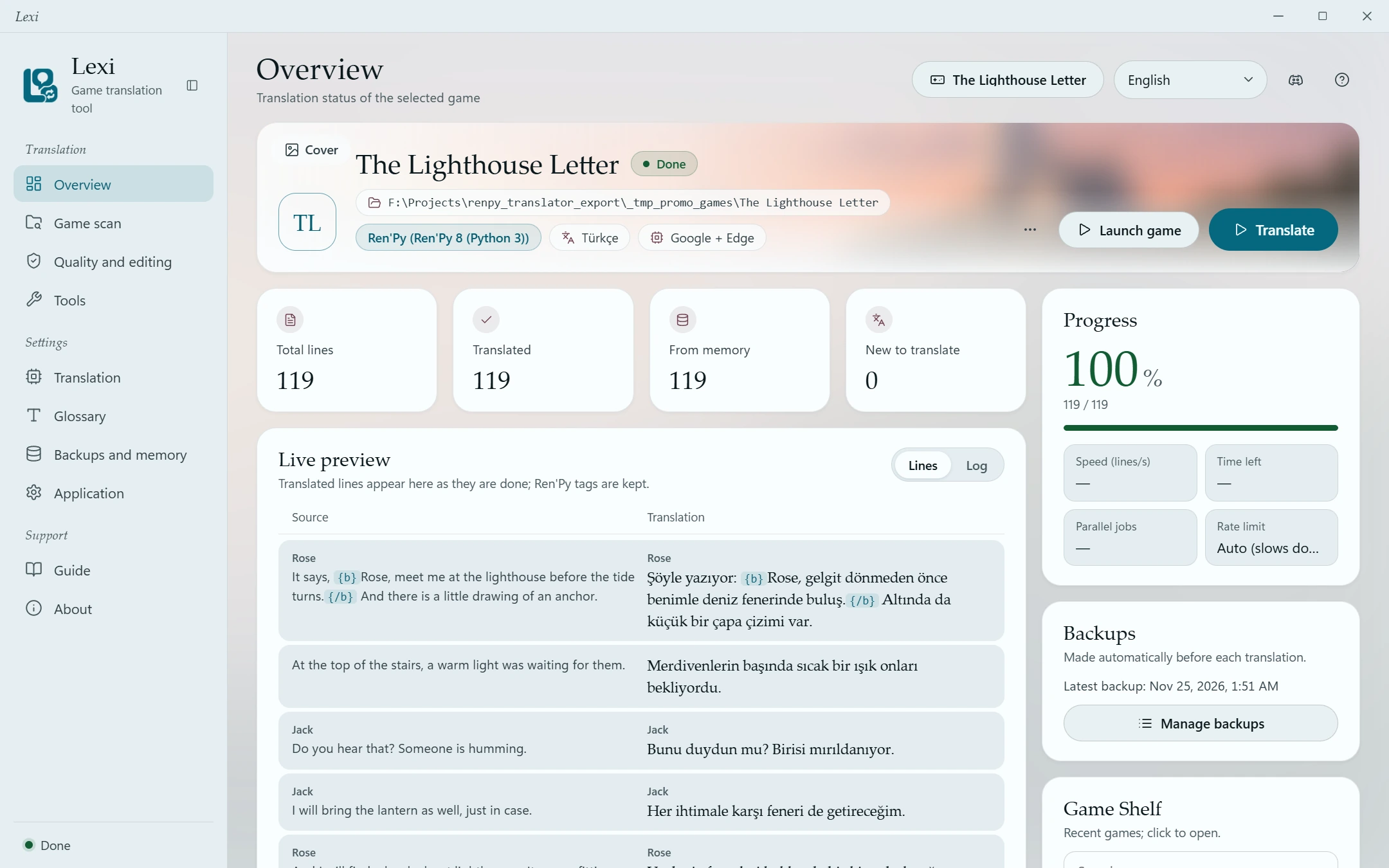
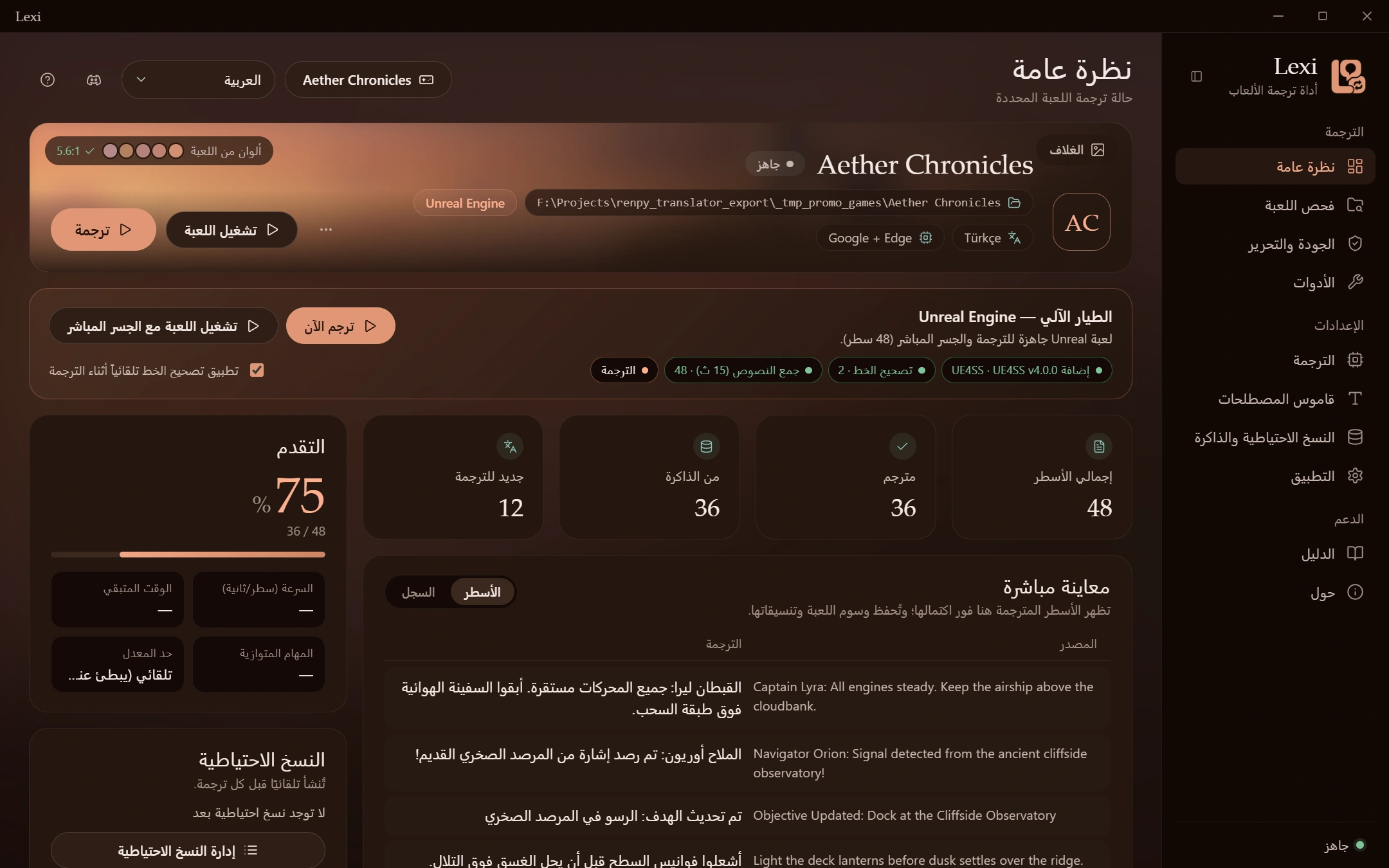
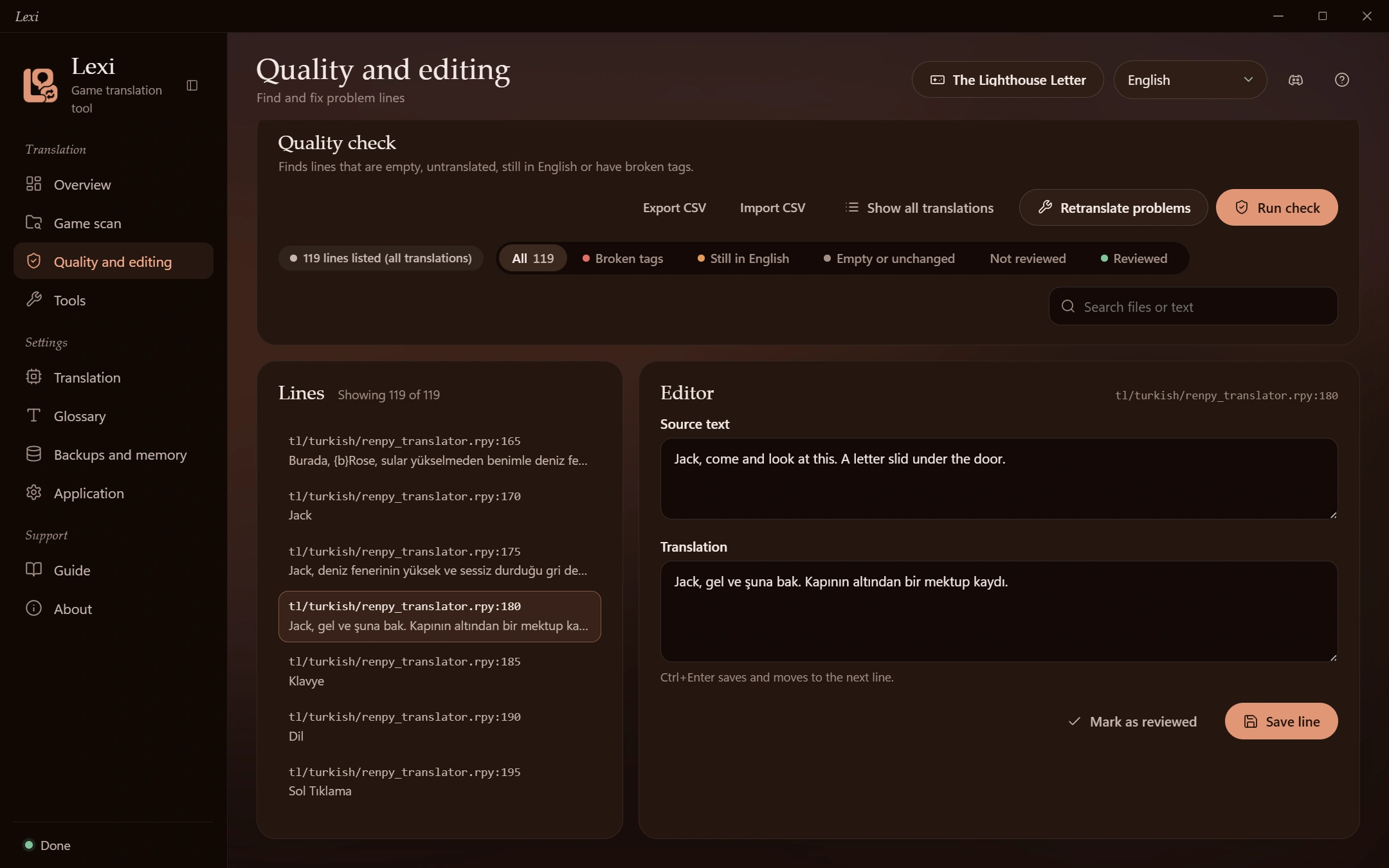
Lexi Game Translator's redesigned desktop interface adapts its color palette to each game's cover art, offers crisp dark and high-contrast light themes (Paper and Daylight) plus custom wallpapers, speaks 12 interface languages (including full native right-to-left Arabic), and includes a built-in quality checker and line editor. Click any screen to view full size:
Not just Ren'Py: how Lexi translates 18 popular game engines
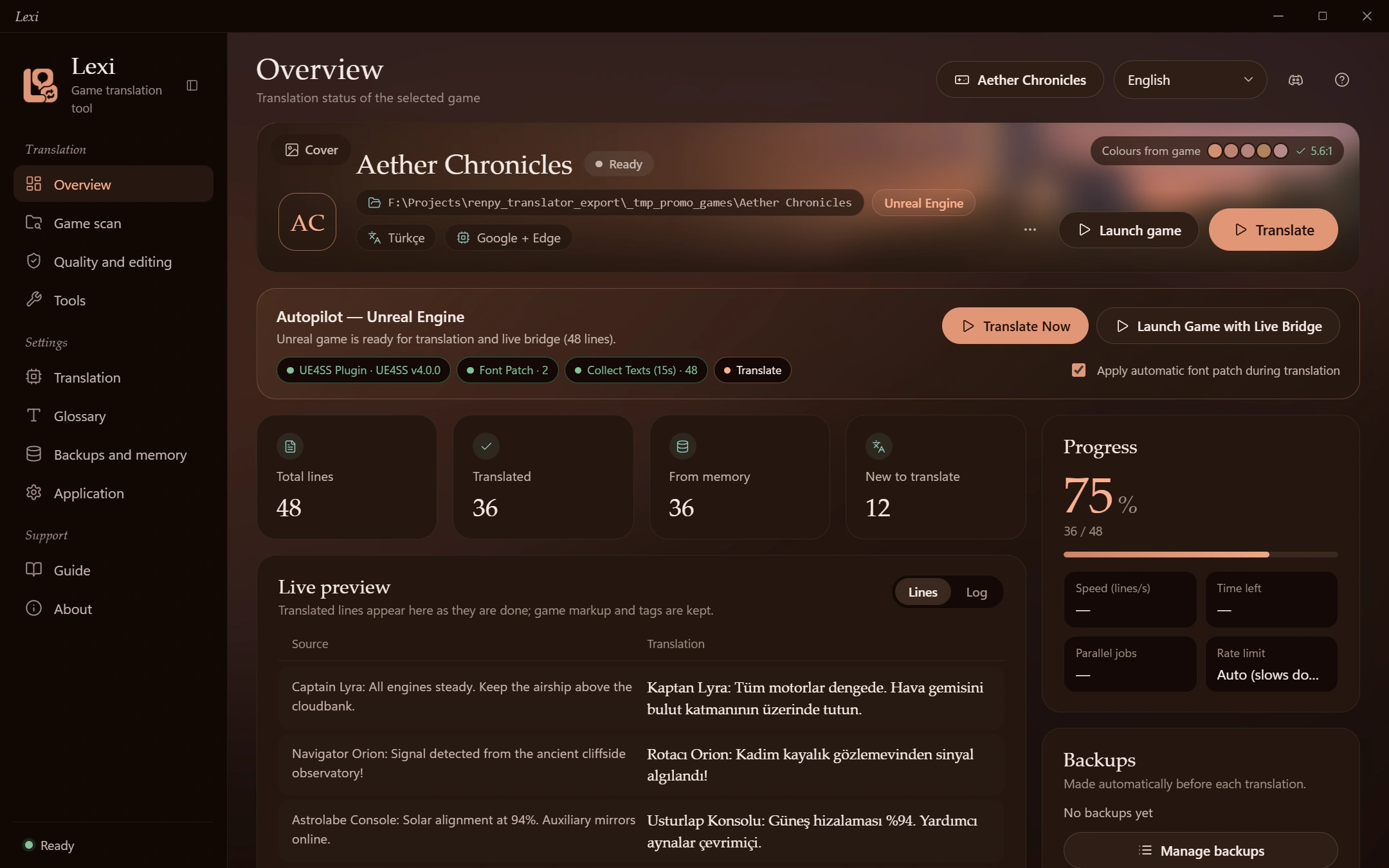
Even though this guide uses Ren'Py as its walkthrough, you follow the exact same workflow — drop the game folder or .exe, choose your language, press Translate — across 18 game engines. Lexi detects the engine automatically and adapts the screen: simple engines stay clean without plugin clutter, while packed Unity and Unreal Engine games get guided Autopilot setup and a local Live Bridge.
RPG Maker series (all 6 generations)
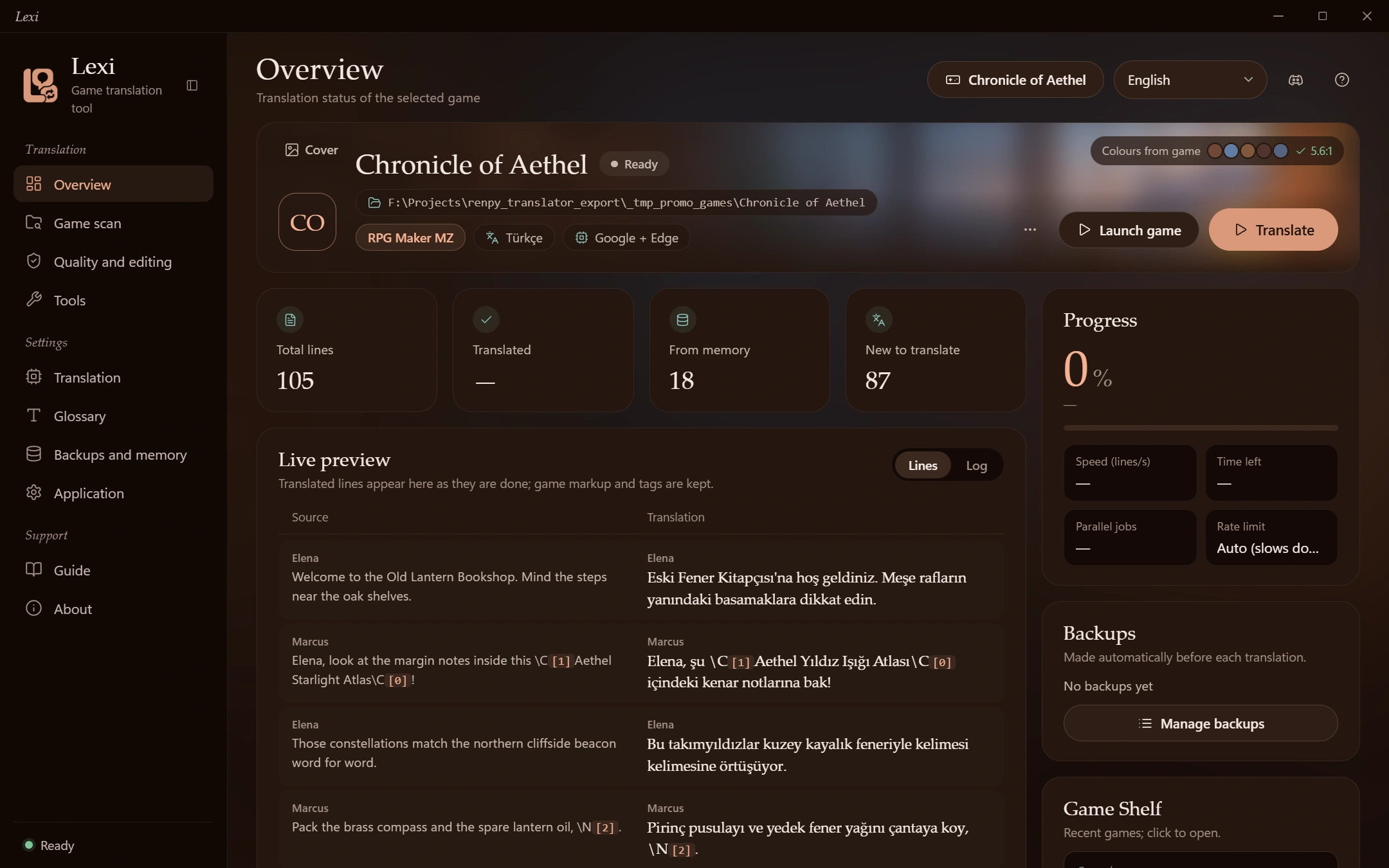
Drop any RPG Maker folder and Lexi detects the exact generation automatically — from modern MV / MZ JSON data to XP / VX / VX Ace Ruby Marshal & .rgss* archives and classic 2000 / 2003 LCF maps (including UTF-8 RPG_RT.INI support).
Control codes such as \C[1], \N[2], and \V[n] stay protected while dialogue, items, skills and menus are translated — with automatic backups, QA, CSV and patch .zip.
Unity games (Mono & IL2CPP)
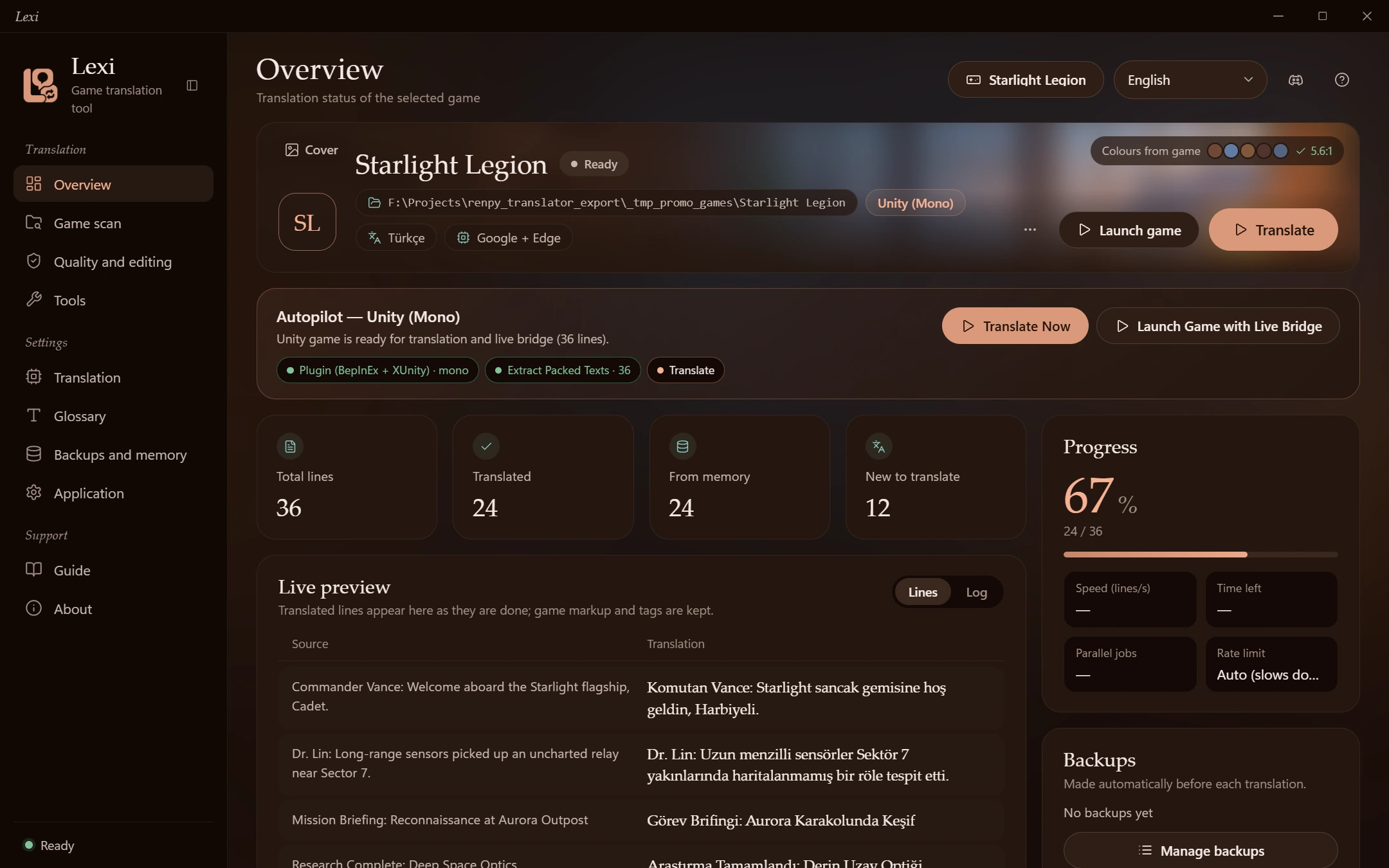
Unity games pack text inside compiled assemblies and asset bundles. With your approval, Lexi's Autopilot installs official BepInEx and XUnity.AutoTranslator (verified by SHA-256), pre-extracts packed text from .assets, Assembly-CSharp.dll or IL2CPP global-metadata.dat, and translates it beforehand.
Press Launch Game with Live Bridge so any dynamic text generated while playing is routed through Lexi's local 127.0.0.1 bridge using your chosen engine and glossary. Games with anti-cheat (EAC/BattlEye) are blocked safely, and everything can be uninstalled cleanly in one click.
Unreal Engine 4 & 5
For games with localization files, Lexi reads loose or unencrypted .pak archives (.locres) and writes a clean override mod into ~mods/ (including UE 5 IoStore companion .utoc/.ucas support) without modifying base game packages.
For games without localization tables, Autopilot configures UE4SS, collects live dialogue tables, connects the local Live Bridge, and can apply an automatic Font Patch (.ufont) so Turkish and accented characters display cleanly.
And 8 more visual novel & indie engines included in the same app
Godot 3 & 4
Translates loose files and unencrypted .pck / embedded .exe packs — including Dialogic 1/2, Dialogue Manager, JSON and CSV localization tables.
TyranoScript / TyranoBuilder
Reads scenario .ks scripts both loose and inside Electron app.asar archives while preserving Tyrano tags and choices.
WOLF RPG Editor
Handles Data.wolf archives, .mps maps and .dat databases cleanly with automatic backups and variable protection.
KiriKiri2 / KiriKiriZ
Supports multi-layer .xp3 archives and .ks scripts with Japanese/UTF-8 handling and tag masking.
HTML / Twine
Translates single-file SugarCube and Harlowe interactive fiction .html games while keeping macros and links working (plus SugarCube UI localization).
GameMaker
Reads and patches data.win / game.unx archives, single-file NSIS executables, and external dialogue files with backup restore.
QSP
Translates .qsp, .gam and .qsps text adventures while protecting QSP expressions and HTML formatting.
SRPG Studio
Supports data.dts archives, project.dat story/dialogue data, and loose localization scripts with speaker-name protection.
Want the full feature breakdown, demo video and plan comparison? Visit the Lexi Game Translator product page.
Practical tips for a cleaner translation
- Glossary & context
- Lexi reads character names from the game's scripts and lists them under Suggested character names. Add them to the Glossary so they stay unchanged, and set fixed translations for recurring terms so they read the same everywhere. For AI engines, Lexi also builds an offline Context Bible of speakers and character notes automatically.
- Quality & CSV
- The Quality and editing page finds lines that are empty, untranslated, still in English or have broken tags. Retranslate problems sends only those lines again, and you can edit any line directly in the app or export/import CSV to review translations in Excel or LibreOffice.
- Game updates
- When a new version of the game comes out, scan and translate it again. Every finished line is kept in the translation memory, so unchanged lines come back instantly and only new or changed lines go to the engine. Lexi also keeps a local copy under Saved translations so your work survives uninstalling or replacing the game folder.
- Backups
- Something looks wrong? Open Backups and memory and press Restore: the whole
gamefolder goes back to the chosen date, and a safety backup of its current state is made first. By default the last three unlocked backups are kept (adjustable from 0 to 10), your first original backup is locked automatically, and you can lock any other backup to keep it for good. - Mods, subtitles & batch
- Under Tools, Lexi can also translate Ren'Py mods (
.rpy/.rpa) with automatic rollback backup, translate.srt/.vttvideo subtitles, export a 1-click patch.zip, and queue multiple games for unattended translation using the free engines.
FAQ / Ren'Py translation
Short answers.
Is Lexi Game Translator free?
Yes. The Basic tier is free, needs no account or sign-in, and translates with the keyless built-in Google and Microsoft Edge chain (plus Bing and Yandex if you provide your own API key). AI translation is optional and unlocked with Lexi Pro ($6/month on Patreon), with a one-time 3-day free AI trial per computer.
Will it change or damage my game files?
The game's own script files are not edited. Lexi writes translation files into game/tl/<language>/ and adds a small language-switcher script, and it makes a verified full backup of the game folder before every translation (automatically locking your first original backup), so you can go back with one click. In free Basic the in-game language menu shows a small “Translated with Lexi” line, which can be turned off in Lexi Pro or during the 3-day trial.
Which Ren'Py games work?
Ren'Py 7 and Ren'Py 8 games, including released games that ship only compiled .rpyc scripts inside .rpa archives, plus optional .srt/.vtt video subtitles and Ren'Py mods. Lexi Game Translator also auto-detects 18 game engines in total, including RPG Maker, Unity, Unreal Engine, Godot, Tyrano, WOLF RPG, KiriKiri, QSP, HTML/Twine, GameMaker, and SRPG Studio; see the product page for the full list.
Do I need an internet connection or an API key?
The default free engine (Google and Microsoft Edge working together) works online and needs no API key. Bing and Yandex are also available in Basic using your own API key. Cloud AI presets in Lexi Pro use your own API key, while local AI models (Ollama, LM Studio, or llama.cpp) run offline on your own computer once downloaded.
Can I switch back to the original language?
Yes. Use the Language button in the game's main menu, or press Shift+L while playing to switch between the translation and the original text.
What if the translation stops halfway?
Nothing is lost. Finished lines are kept in the translation memory, and when you start again Lexi continues where it stopped, so finished work is never paid for twice.
The game shows empty boxes instead of letters. What can I do?
Usually nothing. Lexi checks the game's fonts (including fonts packed inside .rpa archives) for your target language's characters and automatically adds a bundled fallback font when letters are missing, covering Turkish and European accented Latin, Cyrillic, Greek, Vietnamese, Japanese, Korean, Chinese, Thai, Hindi, and right-to-left scripts.
Can I share my translation with others?
Lexi can export a translation patch as a .zip file, but the game's text belongs to its developer. Translate for your own use, and ask the developer for permission before you share a translated patch publicly.
Ready to play in your language?
Lexi Game Translator is free to download for Windows 10 and 11 — 18 engines, keyless free translation, automatic backups, no account required for Basic.